The Walking Skeleton and Pipes & Filters: Building Resilient Integration Architectures

I’ve spent quite some time in IT doing enterprise integration, and if there’s one truth that consistently holds up, it’s that a solid foundation prevents future disappointment or failure. We’ve all been there: a rush to deliver features on a shaky, unvalidated architecture, leading to months of painful, expensive refactoring down the line.

My experience in retail showed me that, and I was involved in rebuilding an integration platform. In the world of integration, where you’re constantly juggling disparate systems, multiple data formats, and unpredictable volumes, a solid architecture is paramount. Thus, I always try to build the best solution based on experience rather than on what’s written in the literature.

What is funny to me is that when I built the integration platform, I realized I was applying patterns like the Walking Skeleton for architectural validation and the Pipes and Filters pattern for resilient, flexible integration flows.

The Walking Skeleton caught my attention when a fellow architect at my current workplace brought it to my attention. And I realized that this is what I actually did with my team at the retailer. Hence, I should read some literature from time to time!

The Walking Skeleton: Your Architectural First Step

Before you write a line of business logic, you need to prove your stack works from end to end. The Walking Skeleton is precisely that: a minimal, fully functional implementation of your system’s architecture.

It’s not an MVP (Minimum Viable Product), which is a business concept focused on features; the Skeleton is a technical proof-of-concept focused on connectivity.

Why Build the Skeleton First?

  • Risk Mitigation: You validate your major components—UI, API Gateway, Backend Services, Database, Message Broker—can communicate and operate correctly before you invest heavily in complex features.
  • CI/CD Foundation: By its nature, the Skeleton must run end-to-end. This forces you to set up your CI/CD pipelines early, giving you a working deployment mechanism from day one.
  • Team Alignment: A running system is the best documentation. Everyone on the team gets a shared, tangible understanding of how data flows through the architecture.

Suppose you’re building an integration platform in the cloud (like with Azure). In that case, the Walking Skeleton confirms your service choices, such as Azure Functions and Logic Apps, which integrate with your storage, networking, and security layers. Guess what I am going to do again in the near future, I hope.

Leveraging Pipes and Filters Within the Skeleton

Now, let’s look at what that “minimal, end-to-end functionality” should look like, especially for data and process flow. The Pipes and Filters pattern is ideally suited for building the first functional slice of your integration Skeleton.

The pattern works by breaking down a complex process into a sequence of independent, reusable processing units (Filters) connected by communication channels (Pipes).

How They Map to Integration:

  1. Filters = Single Responsibility: Each Filter performs one specific, discrete action on the data stream, such as:
    • Schema Validation
    • Data Mapping (XML to JSON)
    • Business Rule Enrichment
    • Auditing/Logging
  2. Pipes = Decoupled Flow: The Pipes ensure data flows reliably between Filters, typically via a message broker or an orchestration layer.

In a serverless environment (e.g., using Azure Functions for the Filters and Azure Service Bus/Event Grid for the Pipes), this pattern delivers immense value:

  • Composability: Need to change a validation rule? You only update one small, isolated Filter. Need a new output format? You add a new mapping Filter at the end of the pipe.
  • Resilience: If one Filter fails, the data is typically held in the Pipe (queue/topic), preventing the loss of the entire transaction and allowing for easy retries.
  • Observability: Each Filter is a dedicated unit of execution. This makes monitoring, logging, and troubleshooting exact no more “black box” failures.

The Synergy: Building and Expanding

The real power comes from using the pattern within the process of building and expanding your Walking Skeleton:

  1. Initial Validation (The Skeleton): Select the absolute simplest, non-critical domain (e.g., an Article Data Distribution pipeline, as I have done with my team for retailers). Implement this single, end-to-end flow using the Pipes and Filters pattern. This proves that your architectural blueprint and your chosen integration pattern work together.
  2. Iterative Expansion: Once the Article Pipe is proven, validating the architectural choice, deployment, monitoring, and scaling, you have a template.
    • At the retailer, we subsequently built the integration for the Pricing domain, and by creating a new Pipe that reuses common Filters (e.g., the logging or basic validation Filters).
    • Next, we picked another domain by cloning the proven pipeline architecture and swapping in the domain-specific Filters.

You don’t start from scratch; you reapply a proven, validated template across domains. This approach dramatically reduces time-to-market and ensures that every new domain is built on a resilient, transparent, and scalable foundation.

My advice, based on what I know now and my experience, is not to skip the Skeleton. And don’t build a monolith inside it. Start with Pipes and Filters and Skeleton for a future-proof, durable architecture for enterprise integration when rebuilding an integration platform in Azure.

What architectural pattern do you find most useful when kicking off a new integration project? Drop a comment!
My Azure Security Journey so far

I like to travel, explore and admire new environments. Similarly, in my day-to-day job, I want to explore new technologies, look at architectural challenges with the solutions I design, and help engineers.

Exploring is my second nature; it’s my curiosity and desire to learn – experience new things. With Cloud Computing, many developments happen daily, including new services, updates, and learnings. I like that, and with my role at InfoQ, I can cover these developments through news stories. Moreover, in my day job, I deal with cloud computing daily, specifically Microsoft Azure and integrating systems through Integration Services.

Exams

An area that got my attention this year was governance and security.  I wrote two blogs this year – a blog on secret management in the cloud and one titled a high-level view of governance. In addition, I started exploring resources from Microsoft on Governance and Security on their learning platform. And recently, I planned to prepare for some certifications for that matter with:

  • Exam SC-900: Microsoft Security, Compliance, and Identity Fundamentals
  • Exam AZ-500: Microsoft Azure Security Technologies
  • Exam SC-100: Microsoft Cybersecurity Architect

I passed the first, and the other two are scheduled for Q1 in 2023.

The goal of preparing for the exams is learning more about security, as its an important aspect when designing integration solutions in Azure.

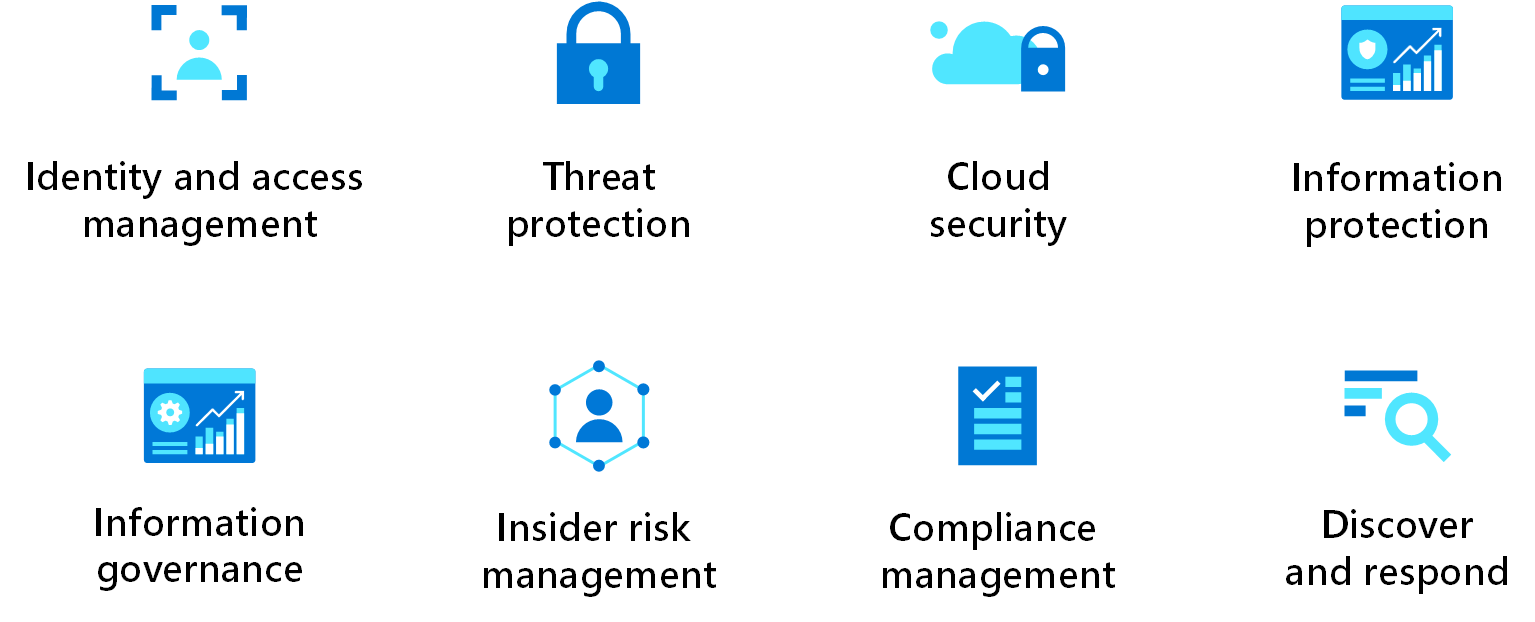
Screenshot showing security design areas.

Source: https://learn.microsoft.com/en-us/azure/architecture/framework/security/overview

Another good source is the well-architected framework: Security Pillar.

New Items

The dominant three public cloud providers, Microsoft, AWS, and Google, provide services and guidance on security on their platforms. As a cloud editor at InfoQ, I sometimes cover stories on their products, open-source initiatives, and architecture. Here’s a list of security and governance-related news items I wrote in 2022:

Source: https://github.com/ine-labs/AzureGoat#module-1

Books

Next to writing news items, my day-to-day job, traveling, and sometimes running, I read books. The security-related books I read and am reading are:

Another one I might get is a recent book published by APress titled: Azure Security For Critical Workloads: Implementing Modern Security Controls for Authentication, Authorization, and Auditing by Sagar Lad.

Microsoft Valuable Professional Security

Another thing I recently learned is that there is a new award category within the MVP program: Azure Security. The focus for this area lies on contributions in:

  • Cloud Security in general on Azure, think about Microsoft Azure services like Key Vault, Firewall, Policy, and concepts like Zero Trust Model and Defense in Depth.
  • Identity & Access, including management, hence Azure Active Directory (AAD) or, in general, Microsoft Entra.
  • Security Information and Event Management (SIEM) & Extended Detection and Response (XDR) – think about Microsoft’s product Sentinel.

Lastly, I am looking forward to 2023, which will bring me new challenges, destinations to travel to, and hopefully, success in passing the exams I have lined up for myself.

A High-Level View of Cloud Governance

Something that intrigues me in the cloud is governance. As a technical integration architect, that’s the role/function I have in my current day-to-day job. Yet, during designing solutions, I usually do not think about it or talk to a customer set on moving to the cloud – that’s a cloud migration process, which I am generally not involved with. Still, it should have my attention, and it has now.

You might ask if it sounds unfamiliar to you, what is governance? First, you could look up the term in Wikipedia. And you’ll find the explanation or definition in the first lines mentioning a process of interactions through laws, norms, power, or language of an organized society over a social system such as tribe, family, formal or informal organization. Yet how does this relate to the cloud? Well, very simple, it is still a process of interactions, however, defined by what a cloud provider deems necessary to keep costs, access to data, consistency, and deployments under control.

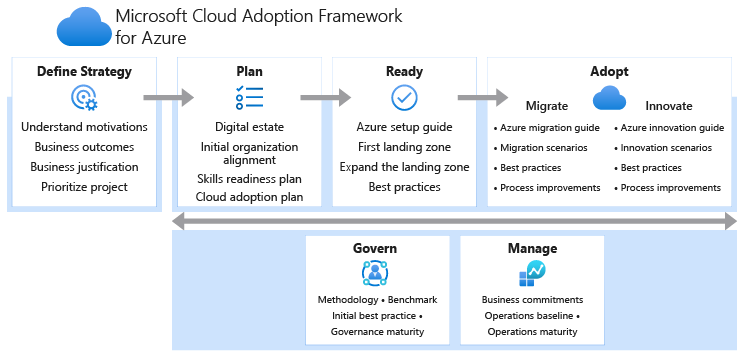
A Cloud provider like Microsoft, AWS, and Google can provide you with guidance regarding governance to manage costs, secure resources and access to data, and consistency in the deployment of resources – each provides frameworks for that:

The Google Adoption Framework whitepaper will mention governance regarding data, cost control, security, and cloud resources management. While AWS CAF has governance as one of its six perspectives. And Microsoft has a section of Govern in their Framework and a landing page.

Microsoft Cloud Adoption Framework

Source: https://docs.microsoft.com/en-us/azure/cloud-adoption-framework/overview

I now like to zoom further into governance on Microsoft Azure since I predominantly work as a (solution) architect (integration) on that Cloud platform. Furthermore, I will not look at the process extensively described in the CAF, yet more on some of the services and capabilities available in Azure and add some of my views and relevant resources I found.

Azure Resources

Microsoft provides policies on Azure to allow you to keep resources compliant. When a policy is assigned, it will, when it is triggered, evaluate if it adheres to a definition. You can use these policies to implement governance for resource consistency, regulatory compliance, security, cost, and management. For more details on Azure Policies, see Azure Policy on GitHub.

Next to policies tagging is another aspect of governance in Azure or any cloud platform. With tags, you can assign helpful information to any resource within your cloud infrastructure – usually information not included in the name of available in the overview of the resource. Tagging is critical for cost management, operations, and management of resources. More details on how to apply them are available in the decision guide.

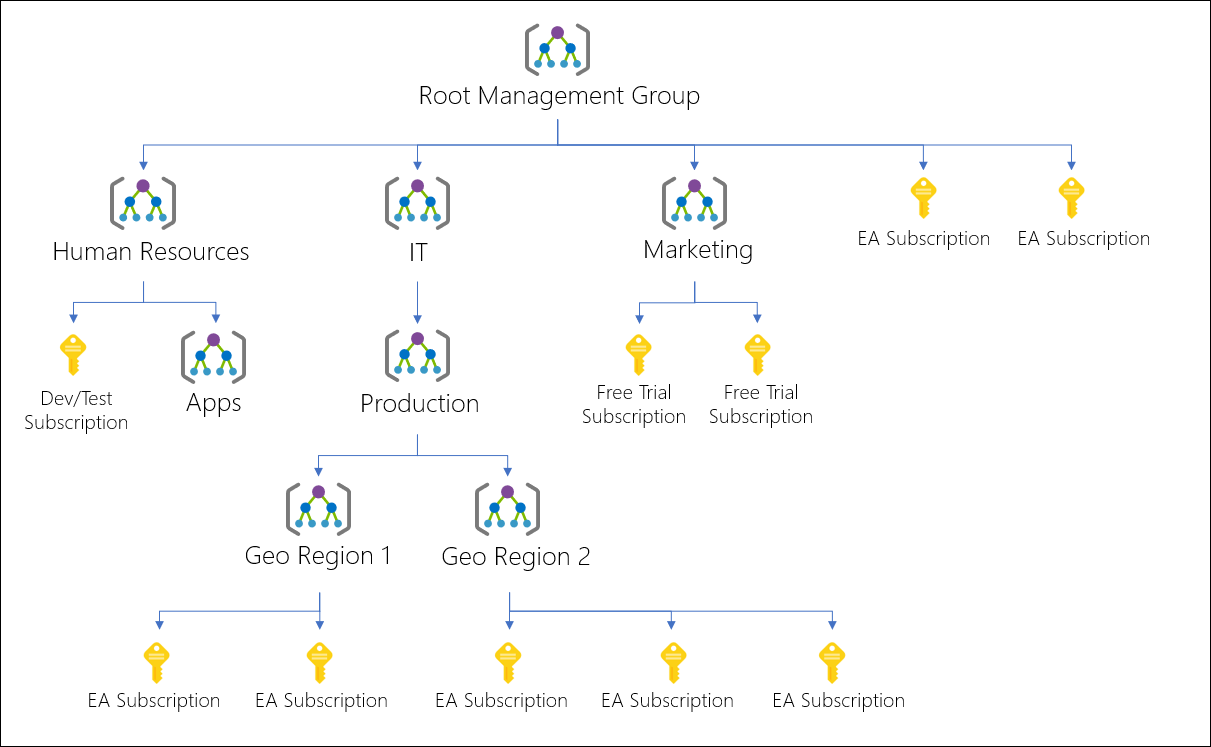
If you work at a company with many subscriptions, or the customer you work for does, you can leverage management groups –a level of scope above subscriptions. It provides a way to organize subscriptions into containers and thus provide a logical structure. Moreover, you can apply specific governance conditions with management groups as each subscription in a group inherits them.

Diagram of a sample management group hierarchy.

Source: https://docs.microsoft.com/en-us/azure/governance/management-groups/overview

More details on management groups are available on the GitHub page.

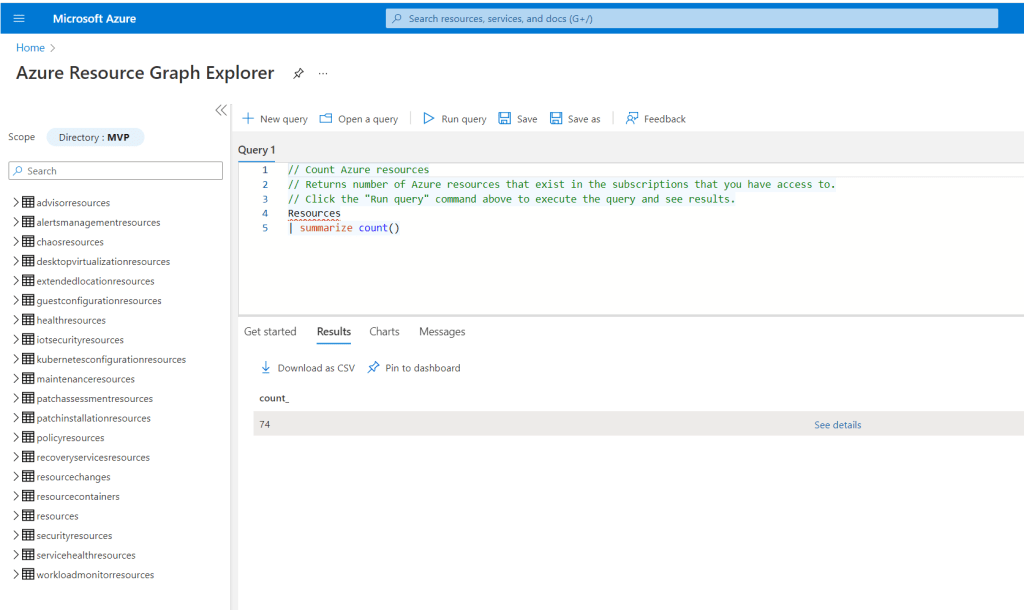
Another intriguing service is the Azure Resource Graph, a capability in Azure to query, explore, and analyze your cloud resources. It includes an Explorer you can use in the Azure portal and can also be used programmatically through the Azure CLI, Azure PowerShell and Azure SDK for .NET.

You can use Graph Explorer to explore resources based on your governance requirements and assess the impact of applying policies in your environments. The query language is based on the Kusto query language used by Azure Data Explorer. More details are available on the GitHub page.

And lastly, Azure Blueprints can enable you to define a repeatable set of Azure resources that implements and adheres to an organization’s standards, patterns, and requirements. As a result, you can orchestrate the deployment of various resource templates and other artifacts such as the earlier mentioned policies, role assignments, ARM templates, and resource groups in a declarative way. With blueprints, you can consistently deploy predefined environments. Other public cloud providers offer blueprints as well: AWS Blueprints and GCP Blueprints. You can find more details on Azure blueprints on GitHub.

Cost Management

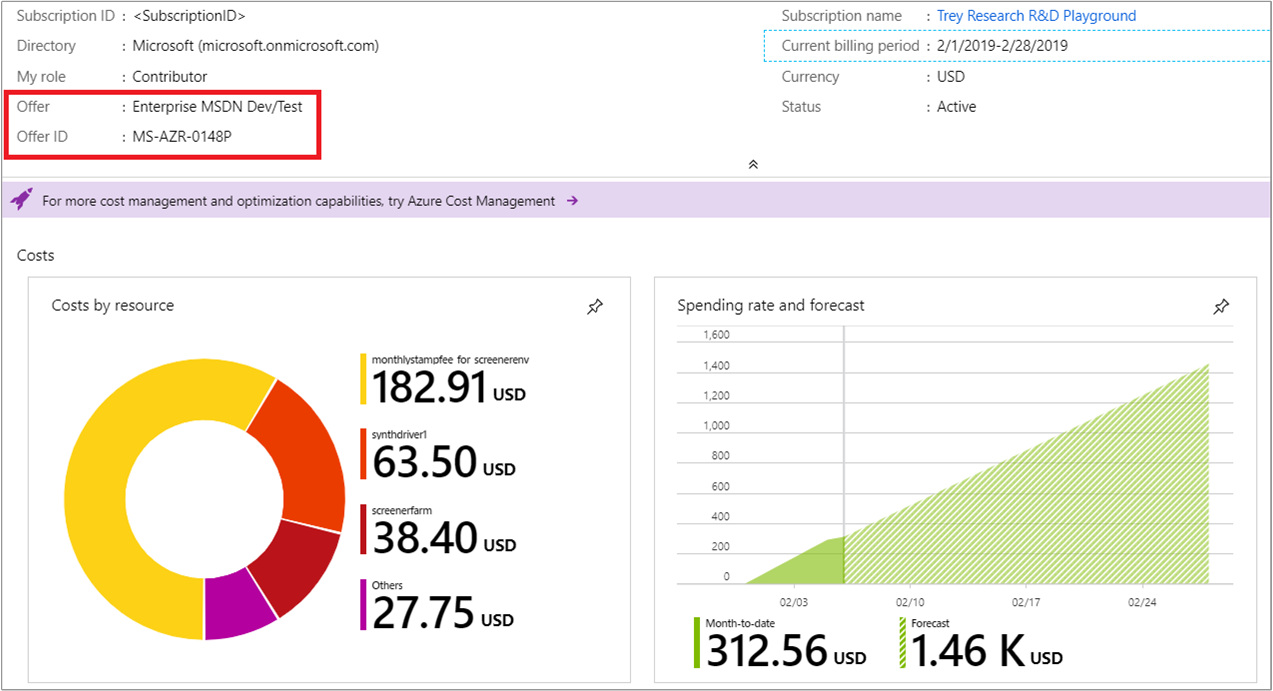
The cost management + billing service and features are available in any subscription in the Azure portal. It will allow you to do administrative tasks around billing, set spending thresholds, and proactively analyze azure cost generation. A key aspect is regarding cost control is to set up budgets at the beginning once a subscription before workloads land or resources are provisioned for the development of cloud solutions. Furthermore, once consumption of Azure resources starts, you can look at recommendations for cost optimizations. Moreover, Azure Advisor can help identify underutilized or unused resources to be optimized or shut down.

Example of the Subscription Overview tab showing Offer and Offer ID

Source: https://docs.microsoft.com/en-us/azure/cost-management-billing/costs/understand-cost-mgt-data

Security

An essential aspect of governance is security, for example, who gets access to what resource in Azure. A consistent way to set that up is by applying the earlier mentioned blueprint. Azure AD plays a role as well when you add accounts, service principles (an identity created for use with applications, hosted services, and automated tools to access Azure resources – similar to a service account on Windows), and app registrations (Application Object).

Azure AD is an Identity and Access solution with several features, such as conditional access, Multi-Factor Authentication (MFA), and Singel-SignOn (SSO) support. In addition, it is an essential service with regards to governance to provide access to the application (services) and people to Azure resources – and you want that consistent and accurate when it comes to who is responsible for what. And lastly, Microsoft provides best practices and guidance on this service you can look into.

Data Governance

Microsoft launched Purview into a public preview for data governance in December 2020, and it became generally available later in October 2021. With Azure Purview, the company delivers an Azure service that can help you understand what data your company has and provide means to manage the data’s compliance with privacy regulations and derive valuable insights.