Modern applications need more than good code. They need scalability, security, reliability, and efficient service communication. Building scalable solutions on Azure starts with a familiar list of services: Front Door at the edge, App Service and Functions for compute, Service Bus between them, Azure SQL, PostgreSQL, and Blob Storage underneath, with Monitor and Application Insights watching.
I draw that architecture often. Five columns, a dozen icons, arrows pointing right. It is a good starting point, and I would pick most of those services again for a mid-sized transactional system. But the drawing has a problem I only see once I build it: every arrow is a happy path. Nothing on it fails, nothing retries, nothing arrives twice, and nothing explains who may talk to whom.
So this time I built it, with the official Azure icons for the pictures and azd up for the rest, and then added the parts the drawing leaves out. Choosing the services is the easy part. Designing reliable communication, handling failures, monitoring performance, and securing every layer is where the work is. The code is in the companion repo.

The services are the easy part of scalable solutions on Azure
One concrete workload sits behind the picture. A client posts an order. The API on App Service stores it in Azure SQL. A message goes over Service Bus. A Function writes a metering row to PostgreSQL. Another Function writes a CSV report to Blob Storage. Front Door sits in front, Application Insights collects telemetry.
The sample does exactly that, a reference implementation of scalable solutions on Azure in one repo: a .NET 8 minimal API on App Service, a .NET 8 isolated Functions app on Flex Consumption, Service Bus Standard, Azure SQL serverless, PostgreSQL Flexible Server, one storage account. Nothing exotic, and all of it deploys from one Bicep file.
What the picture cannot show is what sits between the boxes. That is where “reliable communication” and “handling failures” live, and that is what the rest of this post is about.
What the arrows hide in scalable solutions on Azure

The API never talks to Service Bus
The obvious implementation of “App Service, then Service Bus, then Functions” is: API saves the order, API sends a message. Two writes, two systems, no transaction across them. If the message send fails after the SQL commit, you have an order nobody processes. A crash between the two gives the same result. And when the SQL commit fails after the send, you have a message for an order that does not exist.
The sample uses a transactional outbox instead. POST /api/orders writes the order row and an outbox row in one SQL transaction and returns 202. A timer-triggered Function, OutboxRelay, claims pending outbox rows every ten seconds with UPDLOCK, READPAST and publishes them. The API has no role assignment on Service Bus at all. A messaging outage costs latency, not orders. You can see it in the Bicep: the API identity gets Key Vault Secrets User and nothing else.
The price is ten seconds of lag and a second hop in the trace, which brings me to the next point. If you are still choosing between Service Bus, Event Grid and Event Hubs for this hop, covers that decision.
A timer breaks the trace
Application Insights correlates an HTTP request with the Service Bus send and the triggered Function through the W3C traceparent, carried in the message as Diagnostic-Id. That works when the API sends the message. With an outbox and a timer, the message is sent from a different process with a different operation id, and the order’s story splits in two.
The fix is small. The outbox row stores Activity.Current?.Id from the HTTP request. The relay copies it into the message’s Diagnostic-Id application property. One operation id then spans the POST, the relay, the queue, and ProcessOrder. Query 1 in measure/queries.kql shows the whole chain.

At-least-once means duplicates
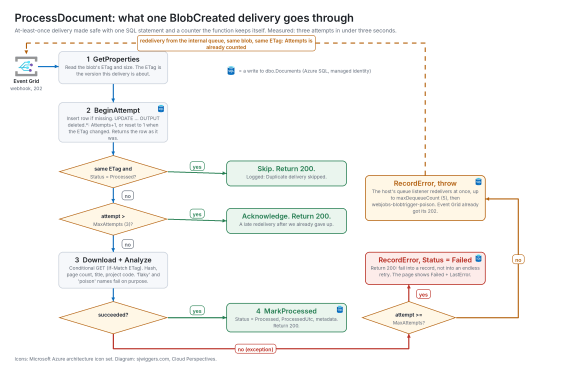
Service Bus delivers a message at least once. A handler that times out, a lock that expires, a scale-out at the wrong moment: all of them produce a second delivery. “Reliable asynchronous communication” means repeated, not exactly once.
The sample catches duplicates in three places, each for a different reason:
- At the API, an
Idempotency-Keyheader is required and backed by a unique index. A client that retries a POST gets the same order back with HTTP 200 instead of a second order with 202. - On the queue, duplicate detection is on with a ten-minute window, and the relay sets
MessageIdto the outbox id. If the relay crashes between sending and marking the row as published, the resend is dropped by Service Bus. - In PostgreSQL, the table has a primary key on
order_idand the insert usesON CONFLICT DO NOTHING. A redelivered message writes nothing and logs a warning.
None of the three covers the other two. Remove any one of them, and there is a path to a duplicate metering row.
Failures need a destination and a reader
Two SKUs in the sample exist only to fail. FLAKY-1 throws on the first two deliveries and succeeds on the third. POISON-1 throws every time. The queue has MaxDeliveryCount set to three, so the poison order lands in the dead-letter queue after three attempts.
A dead-letter queue that nobody reads is a failure that nobody sees. So the sample has two readers. DeadLetterMonitor is a Function on orders/$DeadLetterQueue that writes a FailedOrders row in SQL and flips the order status to Failed, so the console shows it. And a metric alert on DeadletteredMessages > 0 for the orders entity emails the action group. The Function gives you the record; the alert gives you the interrupt. You want both.
The queue overview after the run makes the point for me: the dead-letter count reads zero, because the Function drained it within seconds. Without the alert, the only evidence would be the FailedOrders row. The same blade shows 111 incoming messages against 124 outgoing; the 13 extra deliveries are the retries, the flaky and poison orders and the dead-letter receive, visible in a platform metric before you write a line of KQL.

Front Door is only a shield if the origin refuses everything else
Front Door brings global load balancing, DDoS protection, and a WAF. All true, and all irrelevant if app-xyz.azurewebsites.net still answers directly. Then the WAF rules, the rate limit, and the TLS policy are optional for anyone who finds the origin hostname, which takes one DNS lookup.
The sample locks the origin: the App Service access restriction admits the AzureFrontDoor.Backend service tag only when the request carries the X-Azure-FDID header of this specific Front Door profile, and the default action is Deny. The API checks the header a second time in middleware, because an access restriction that someone relaxes during an incident is the kind of mistake that surfaces months later.
Front Door Standard carries custom WAF rules and rate limiting. The sample has two: 300 requests per minute per client on /api/, and a block on POSTs that are not application/json. The managed OWASP rule set and bot protection need Premium, which costs roughly ten times the Standard base price. For a demo, Standard. For a public API, do the Premium maths before you decide.
Secrets in scalable solutions on Azure: zero, except one
Service Bus has local auth disabled. The storage account has shared key access disabled. Azure SQL is Entra-only, with the API’s managed identity as the server administrator; the API creates the Worker’s contained database user at startup, so no human ever holds a SQL login. The API runs on a system-assigned identity, the Worker on a user-assigned one (the reason is in the first-run section below), and the role assignments in infra/modules/roles.bicep are the complete list of who may touch what. It is the same stance I took in the Azure Functions MCP server post: access is not authority, and the role list is the authority.
The one exception is PostgreSQL. Flexible Server supports Entra authentication, but creating the managed identity’s role requires a pgaadauth_create_principal call from a session that is already authenticated as the Entra admin, which means a psql round trip in the deployment. I did not want a deployment step that depends on a local psql. So the sample generates a password once in the preprovision hook, Bicep stores it in Key Vault, and both apps read it through a Key Vault reference. It is a secret, it is stored once, and it never appears in an app setting in clear text. It is also the one line in this repo I would change first in a real system.
Where this is the wrong answer
Not every workload needs this much machinery, and three parts of these scalable solutions on Azure deserve a second look before you copy them.
Two databases. The architecture puts relational data in Azure SQL and metering data in PostgreSQL, and the sample follows it so you can see the cost. Two engines means two connection patterns, two auth models, two sets of backups and, in this sample, two schema bootstrap paths. If there is no reason for the split other than habit, use one. The sample would lose nothing by putting metering_events in Azure SQL.
Front Door for a single-region app. The sample runs in one region. Front Door adds a global anycast edge, a WAF, and a fixed monthly fee of around 35 dollars before traffic. If the users are in one country and the app is in one region, Application Gateway or even App Service’s own access restrictions plus a WAF-less setup may be the better trade. Front Door earns its place when you have more than one origin or more than one continent.
An outbox when the write is not valuable. The outbox buys you “no accepted order is ever lost” at the cost of a relay and a ten-second delay. For a telemetry ping or a cache invalidation, send the message directly and accept the occasional loss.
What the first run against Azure taught me
The measured run
The measured run, python measure/drive.py all against swedencentral through the Front Door endpoint:
- POST /api/orders through Front Door: 955 to 1,234 ms p50 and 1,712 ms p95 once warm. The very first call took 6.8 s, which is Azure SQL serverless resuming from auto-pause. The free offer pays for itself with that one number.
- Happy path: Accepted to Metered in 9.0 s, one delivery. Roughly half of that is waiting for the ten-second relay timer.
- Duplicate submit: first POST 202, second POST with the same
Idempotency-Key200, same order id. One row, one message. - Flaky order: Metered on delivery 3 after 6.4 s. Service Bus redelivers an abandoned message immediately, so two failures and a success fit inside one lock duration.
- Poison order: Failed after 10.2 s. The dead-letter message reports
DeliveryCount4 against aMaxDeliveryCountof 3, because the count includes the receive from the dead-letter queue itself. If you alert on that number, know what it counts. - Burst of 50: all accepted in 6.8 s, 48 Metered after 50 s, all 50 after 97 s. The relay claims 50 rows every ten seconds, and the handler runs eight at a time; both are settings, not ceilings.
- Report: one CSV in Blob Storage with two SKU rows, the run recorded in PostgreSQL.
Four things that broke first
Four things broke before any of that worked, and each one is a sentence an architecture drawing has no room for:
InvariantGlobalization=truein the API project. It shrinks the container image and Microsoft.Data.SqlClient refuses to open a connection under it. The first deploy failed at the first SQL call.CREATE USER ... FROM EXTERNAL PROVIDERfor the Worker’s identity. Azure SQL can only resolve that name if the server has its own managed identity with Directory Readers in Entra, a tenant-admin step I did not want insideazd up. The way around is to create the user by SID:CREATE USER [name] WITH SID = 0x<clientId as 16 bytes>, TYPE = E. That needs the identity’s client id, which Bicep only exposes for a user-assigned identity. So the Worker got one.- Key Vault references on a user-assigned identity. After the switch, the Worker still received the literal
@Microsoft.KeyVault(...)string as its PostgreSQL password and failed every order with28P01. App Service resolves references with the system identity unlesskeyVaultReferenceIdentitypoints at the user-assigned one. The API, still on a system identity, never noticed. - The azd environment name went into every resource name, and my own Bicep capped it at twelve characters. Resource names have limits; take the first twelve and move on.
![Measured run of the scalable solutions on Azure sample: happy path, duplicate, flaky, poison, burst of 50 and report"] [SCREENSHOT 1: orders console | alt: "Orders console showing Accepted, Published, Metered and Failed orders behind Azure Front Door](https://i0.wp.com/sjwiggers.com/wp-content/uploads/2026/10/Accepted-Published-Metered-and-Failed-rows.png?resize=584%2C490&ssl=1)
Closing
The services on the drawing are the right ones, and picking them took five minutes. Reliability is an outbox, an idempotency key, a dead-letter reader, and an alert. Security is an origin that refuses direct traffic and role assignments short enough to read. Monitoring is one operation id that survives a timer. None of those are services you pick from a catalog. They are decisions you make between the boxes, and they are the part of “scalable solutions on Azure” that no icon set can draw for you.
The repo is at github.com/steefjan1/scalable-solutions-azure. azd up, run measure/drive.py, break it in your own way, and azd down before the Front Door line shows up on the invoice.
Sources
- Microsoft Learn, Secure traffic to Azure Front Door origins
- Microsoft Learn, Azure Front Door tier comparison
- Microsoft Learn, Service Bus duplicate detection
- Microsoft Learn, Service Bus dead-letter queues
- Microsoft Learn, Distributed tracing and correlation through Service Bus messaging
- Microsoft Learn, Azure Functions Flex Consumption plan
- Microsoft Learn, Use Key Vault references in App Service and Azure Functions
- Microsoft Learn, Microsoft Entra authentication with Azure Database for PostgreSQL flexible server
- Microsoft, Azure architecture icons
- Microservices.io, Transactional outbox pattern