Event-Driven Services in the Cloud: Azure Event Grid, AWS Event Bridge, and Google EventArc

I mentioned Azure Event Grid in a scenario with D365FO Business Events in a previous blog post. It is a Platform as a Service (PaaS) capability in Azure or eventing platform or event bus (I see various terms describing the service) allowing you to centrally manage events. In addition, it supports direct event filtering based on event type, prefix, or suffix, so your application will only receive events that are relevant to it.

Whether you want to handle built-in Azure events, such as a file being added to storage, or create your own custom events and event handlers, Event Grid supports both options via the same underlying model. Thus, regardless of the service or use case, intelligent routing and filtering capabilities apply to every event scenario and ensure that your apps focus on core business logic rather than worrying about event routing.

In this blog post, I like to dive into Azure Event Grid and competitive offering on the two other big cloud providers, AWS and Google.

Azure Event Grid

In 2017 Microsoft introduced Azure Event Grid as a fully-managed event routing service and the first of its kind (meaning the public cloud claimed it was the first offering the service). Dan Rosanova, previously Principal Program Manager Lead at Microsoft, now Director Program Management at Confluent, said in an InfoQ news item on the introduction:

Azure Event Grid fills a gap in the current cloud messaging space, not just in Azure but also across all cloud providers. We have services for messaging, queuing, and telemetry, but nothing for comprehensive eventing, particularly for cross-service or cross-cloud scenarios.

Within Azure service supporting Event Grid generates events routed to several event handlers. These handlers support event filtering and reliable delivery, ranging from Azure Functions to webhooks. Furthermore, underhood, the service relies on Service Fabric and thus can scale automatically to handle millions of events per second.

Event Grid model of sources and handlers

Source: https://docs.microsoft.com/en-us/azure/event-grid/overview

The Event Grid concept revolves around events emitted from a source (publisher), an Azure service, or a third-party source that adheres to the event schema (proprietary schema or the CNCF Cloud Events schema). For example, IoT Hub, Storage, and others are all event publishers in Azure. Following that, the events are sent to a topic in Event Grid, and each topic can have one or more subscribers (event handlers). A topic can be set up with the event publisher, or it can be a custom topic for custom events. Finally, event handlers respond to and process the events. Functions, WebHooks, and Event Hubs are examples of event handlers in Azure.

Azure Event Grid generally became available (GA) in February 2018 and Clemens Vasters, Principal Architect Messaging Services at Microsoft, said:

Event Grid is catching everyone’s attention because it unlocks new architectural possibilities for cloud platforms and applications: it’s the glue that enables information flow between services, and Event Grid allows expanding the capabilities of existing services by extension.

And that’s what also triggered or got the attention of AWS as they released EventBridge in July 2019, labeled as a serverless event bus that allows AWS services, Software-as-a-Service (SaaS), and custom applications to communicate with each other using events.

Since the GA, Azure EventGrid received several updates, including advanced filtering, retry policies, and support for CloudEvents. More details and samples are available on the Microsoft documentation and GitHub. Note that there is also an introductory paper available on Azure Event Grid and GitHub from Clemens.

AWS Eventbridge

You can use EventBridge to build and manage event-driven solutions by centrally controlling event ingestion, delivery, security, authorization, and error handling. Furthermore, you do not have to manage any infrastructure or scaling and only pay for the events that their applications consume, similar to Azure Event Grid. Moreover, the concepts are the same too.

How Amazon EventBridge connects applications using events

Source: https://aws.amazon.com/eventbridge/

However, Amazon Eventbridge surpasses Azure Event Grid with features (as you can see from the diagram above). It has a schema registry allowing you to discover, create, and manage OpenAPI schemas for events on EventBridge. According to the documentation, you can find schemas for existing AWS services, create and upload custom schemas, or generate a schema based on events located on an event bus. Furthermore, EventBridge enables you to generate and download code bindings for all event schemas to help quickly build applications that use those events.

Next to the schema registry, the service integrates easily with third-party services like Zendesk, Pagerduty, and SignalFx. Amazon has set up an extensive partner program for these integrations. Event Grid supports partner events (still preview) yet only has one with Auth0.  

Another capability Amazon EventBridge offers is event replay and archive –  allowing you to archive events so that you can easily replay them later by starting an event replay. Again, a capability that is not available in Azure Event Grid. Although it is something, you can find in Azure Event Hubs. You can configure the archive capability with the actions menu on the EventBridge Console and set the events’ retention period (ranging from zero days to infinite). Subsequently, you can optionally set a pattern matching filter for which events to archive. Later, when events run through the event bus, you can replay the events by selecting the appropriate archive.

Sample Implementation AWS EventBridge

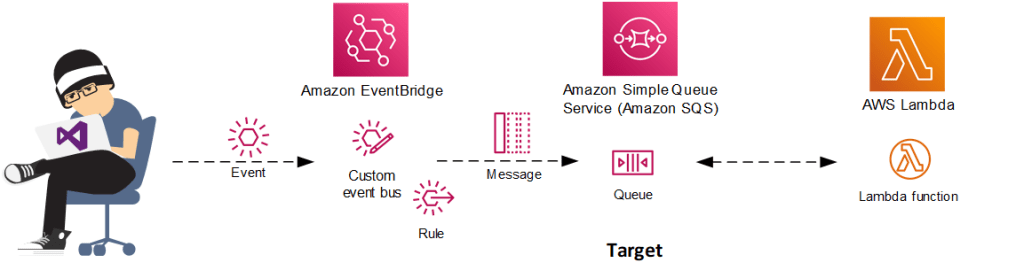
Since the inception of Event Grid, I followed its evolution and wrote and presented on it. Moreover, I followed its competitive solution on AWS and, next to writing about it on InfoQ, built a simple demo around it using .NET in combination with AWS EventBridge. Below you will find a diagram of the demo I created.

Amazon EventBridge Demo

From .NET code, I send an event to a custom event bus containing a rule to send the event to a destination, an Amazon Simple Queue. Subsequently, an AWS Lambda function can poll the queue and receive the message – below shows the steps until the SQS queue.

EventBridge Demo Steps

You can find a live demo on YouTube with demoing the above (minute 19). Furthermore, you can look at other samples like in the AWS documentation or on GitHub.

Google Eventarc

With Azure and AWS offering a service to centrally manage events, Google followed in October 2020 with Eventarc to provide customers with a service to connect Cloud Run services with events from various sources, adhering to the CloudEvents standard. It became generally available in January 2021.

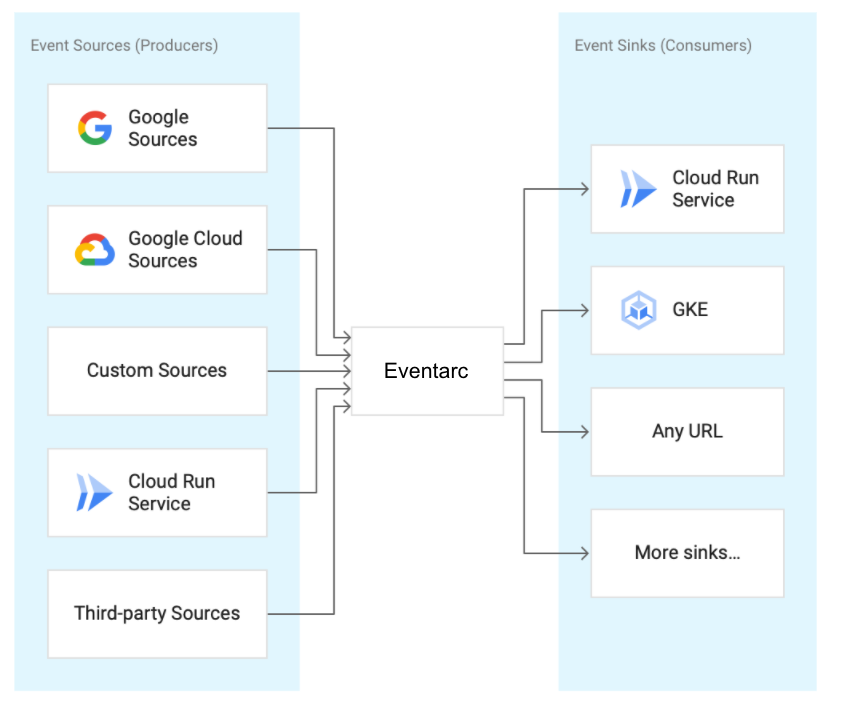
Eventarc’s underlying delivery mechanism is Pub/Sub, which includes topics and subscriptions similar to previously discussed Event Grid and EventBridge. Event sources create events and publish them in any format on the Pub/Sub topic. The events are then delivered to the Google Run sinks. For applications running on Cloud Run, you can use Eventarc to use a Cloud Storage event (via Cloud Audit Logs) to trigger a data processing pipeline or an event from custom sources (publishing to Cloud Pub/Sub) to signal between microservices.

Eventarc Overview

Source: https://codelabs.developers.google.com/codelabs/cloud-run-events#1

The diagram above shows what Google hopes to achieve with Eventarc. Currently, you can Cloud Run Service as a destination, and recently Cloud Run for Anthos has been added. Additionally, you can leverage a UI through the Google Cloud console allowing you to view, edit, and delete EventArc triggers. Lastly, you can find more details and samples on GitHub.

CloudEvents Schema

Before I end the blog post with some conclusions, I like to discuss the CloudEvent schema. CloudEvents is an open-source specification for consistently describing event data to make event declaration and delivery easier across services, platforms, and beyond. The Cloud Native Computing Foundation (CNCF) is the driving force behind the specification, which reached the version 1.0 milestone in October 2019.

Clemens Vasters, Principal Architect Messaging Services at Microsoft, stated in an InfoQ news item on CloudEvents:

The goal was to provide an industry definition and open framework for what an “event” is, what its minimal semantic elements are, and how events are encoded for transfer and how they are transferred and do so using the major encodings and application protocols in use today rather than inventing new ones.

Earlier I mentioned that Azure Event Grid has its own proprietary schema and supports CloudEvent schema. The differences are shown below:

CloudEvent vs Event Grid Schema

Note that Azure Event Grid and Google Eventarc support the CloudEvent schema; however, AWS EventBridge does not, leading to customization.

Conclusion

From this blog post, you can probably conclude that AWS with Eventbridge delivers the most complete event bus or eventing platform in the cloud than Event Grid and Eventarc. If I rank each, AWS comes first, Azure second, and Eventarc third based on features and maturity. The service overlap in concepts, yet implementation, support, and features differ dramatically. Interestingly, they all support changes in their respective storage service. Azure Event Grid brings support for events like when blobs are created, and EventBridge supports S3 notifications and Eventarc triggers for Cloud storage. You can think of various scenarios regarding storage and events, for instance, the pipe and filters pattern implementation discussed in my first blog post.

Secret Management in the Cloud

I have been using Azure Key Vault for secret management for the last two or three years in my projects or advice my peers, client, and colleagues I work with to do so. Azure Key Vault is a service that provides storing and managing secrets with policies and the ability to access them using .NET code. Moreover, it is not just .NET yet also a service principal that can access it to get a secret for establishing a connection or a pipeline. The secrets can be API keys, connection strings, credentials, certificates, etc. I like to discuss a secret management use case in this blog post and dive into its details.

Use case Key Vault and D365 FO Business Events

In a recent project regarding unlocking data from a Dynamics 365 Finance and Operations (FO) instance, I leveraged the concept of Business Events, where a Logic App subscribes to a specific event published on a custom Event Grid Topic. Let me further explain the scenario and where Key Vault comes into play. Below you see a diagram of integration between D365 FO and third party system. The latter receives data from D365 based upon a specific business event.

D365 FO Business Events

Within D365 FO, you can define a destination for a business event. As shown in the diagram, the destination is an Event Grid Topic. When following the Microsoft documentation of Business Events and Event Grid, you will notice that a Key Vault is required to keep the access key of the Event Grid Topic as a secret. Furthermore, you will need to create a so-called App registration in

Azure Active Directory. Azure App registrations are a simple and effective way to configure authentication and authorization workflows for many client types. In this case, a client identifying D365 – allowing access to the Key Vault instance to extract the access key for the custom Event Grid Topic.

Once the app registration is in place, the next step is to add it to the access policies in the Key Vault instance. The registration represents D365, and it needs access to the Key Vault to extract the access key for the Azure Event Grid topic. The app registration only requires the Get and List secret permissions to retrieve the Key Vault secrets.

The endpoint configuration is the next step when the app registration and policy are in place, the custom Event Grid topic is available, and its access key is a secret in Key Vault. The screenshot below shows the configuration of an actual endpoint (destination) for the events – the custom Event Grid topic.

Business Event Endpoint Configuration

For configuring the endpoint (destination), you need to provide a name. So first, the endpoint type is filled in by default, followed by the endpoint URL (destination endpoint – Event Grid topic URL) and then the details for the Key Vault. These details are the client id of the app registration, its secret, the DNS name of the Key Vault instance, and key vault secret name – which has the secret, i.e., access key to the custom Event Grid topic. And finally, you can press Ok for the creation of the endpoint. You can subsequently attach the endpoint to the necessary business event and activate it when the endpoint is created.

Once the endpoint is active and a specific business event is attached to the endpoint, the event will end up with the subscriber – Logic App. An example of a business event is shown below:

{

  “BusinessEventId”: “PurchaseOrderConfirmedBusinessEvent”,

  “ControlNumber”: 5637365024,

  “EventId”: “9D42A382-12E8-48F6-9BB2-29A1G4E39773”,

  “EventTime”: “/Date(1642759229000)/”,

  “LegalEntity”: “fnl1”,

  “MajorVersion”: 0,

  “MinorVersion”: 0,

  “PurchaseJournal”: “PO1-002342-11”,

  “PurchaseOrderDate”: “/Date(1642723200000)/”,

  “PurchaseOrderNumber”: “PO1-002342”,

  “PurchaseType”: “Purch”,

  “TransactionCurrencyAmount”: 1553.46,

  “TransactionCurrencyCode”: “EUR”,

  “VendorAccount”: “IFF1095”

}

The Logic App can use the details to retrieve more information (through OData calls) about the purchase order in this case. And as shown in the diagram, send the enriched json to a service bus queue to handover the another Logic App to transform it into an XML to be sent to an application Basware (provider of software for financial processes, purchase to pay, and financial management).

Managing Key Vault

To properly set up the process around Key Vault and secrets, the administrator (Azure Ops) is responsible for creating the app registration. The administrator will make the app registration and manage the Key Vault. Moreover, the person is also the one in my view that does the endpoint configuration. Therefore, the integration developer will only need to connect the Logic App to the Event Grid topic. Similarly, the SFTP connection requiring credentials or certificates can also leverage the Key Vault and require the same administrator.

The diagram below shows what the administrator can do regarding the app registration and managing the Key Vault instance. Also, the authentication process is shown from the application side – in our case, creating the endpoint from D365. Finally, D365 will use the app registration to authenticate against Azure AD to retrieve a token necessary to access the key vault secret.

Key Vault Management

I like to point here regarding this scenario that business events might need to be set up again when a database refresh is done. Note that when the endpoint configuration fails, you can see an error like:

Unable to get secret from Key Vault DNS: <dns of the key vault instance> Secret name: <name secret>

In that case, either the app registration client id or secret is wrong, or worse, the app registration is expired (the error messages will not tell you that!). An app registration expires (the max is two years). Hence, be aware that the events when the app registration is expired will not reach the Event Grid topic, and errors will occur on the D365 side. Therefore, I recommend monitoring the expiration for the app registration, and also, the secrets can have an expiry date – so keep an eye on that too!

Other Cloud Public Cloud Providers

Interestingly, Azure is not the only public cloud platform with a secret certificate and key management service. For example, AWS actually has three services – AWS Secrets Management, AWS Certificate Manager, and AWS CloudHSM. With AWS Secrets Manager, users can manage access to secrets using a fine-grained set of policies, control the lifecycle of secrets, and secure and audit secrets centrally. Furthermore, this is a managed service with a pay-as-you-go model available in most AWS regions. Sound familiar? Azure Key Vault is similar, right? Almost, yet Key Vault has most of the capabilities found in the three earlier mentioned AWS Services.

What about the Google Cloud Platform? Well, on GCP, you will find Secret Manager, which also enables users to store and manage secrets, including policies and rotation. Furthermore, the service offers management of certificates. And lastly, the public cloud has a separate service for key management with Key Management Service (KMS).

A High-Level View of Cloud Governance

Something that intrigues me in the cloud is governance. As a technical integration architect, that’s the role/function I have in my current day-to-day job. Yet, during designing solutions, I usually do not think about it or talk to a customer set on moving to the cloud – that’s a cloud migration process, which I am generally not involved with. Still, it should have my attention, and it has now.

You might ask if it sounds unfamiliar to you, what is governance? First, you could look up the term in Wikipedia. And you’ll find the explanation or definition in the first lines mentioning a process of interactions through laws, norms, power, or language of an organized society over a social system such as tribe, family, formal or informal organization. Yet how does this relate to the cloud? Well, very simple, it is still a process of interactions, however, defined by what a cloud provider deems necessary to keep costs, access to data, consistency, and deployments under control.

A Cloud provider like Microsoft, AWS, and Google can provide you with guidance regarding governance to manage costs, secure resources and access to data, and consistency in the deployment of resources – each provides frameworks for that:

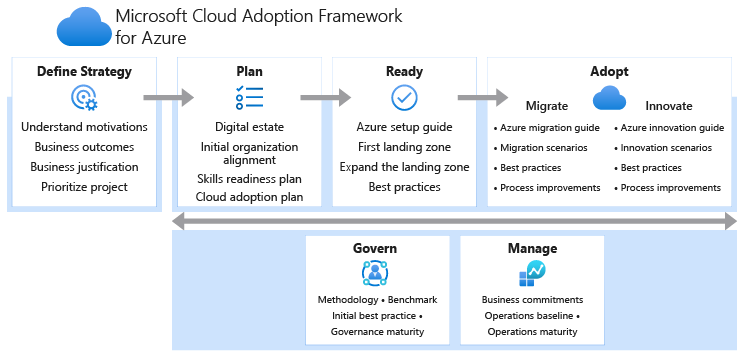
The Google Adoption Framework whitepaper will mention governance regarding data, cost control, security, and cloud resources management. While AWS CAF has governance as one of its six perspectives. And Microsoft has a section of Govern in their Framework and a landing page.

Microsoft Cloud Adoption Framework

Source: https://docs.microsoft.com/en-us/azure/cloud-adoption-framework/overview

I now like to zoom further into governance on Microsoft Azure since I predominantly work as a (solution) architect (integration) on that Cloud platform. Furthermore, I will not look at the process extensively described in the CAF, yet more on some of the services and capabilities available in Azure and add some of my views and relevant resources I found.

Azure Resources

Microsoft provides policies on Azure to allow you to keep resources compliant. When a policy is assigned, it will, when it is triggered, evaluate if it adheres to a definition. You can use these policies to implement governance for resource consistency, regulatory compliance, security, cost, and management. For more details on Azure Policies, see Azure Policy on GitHub.

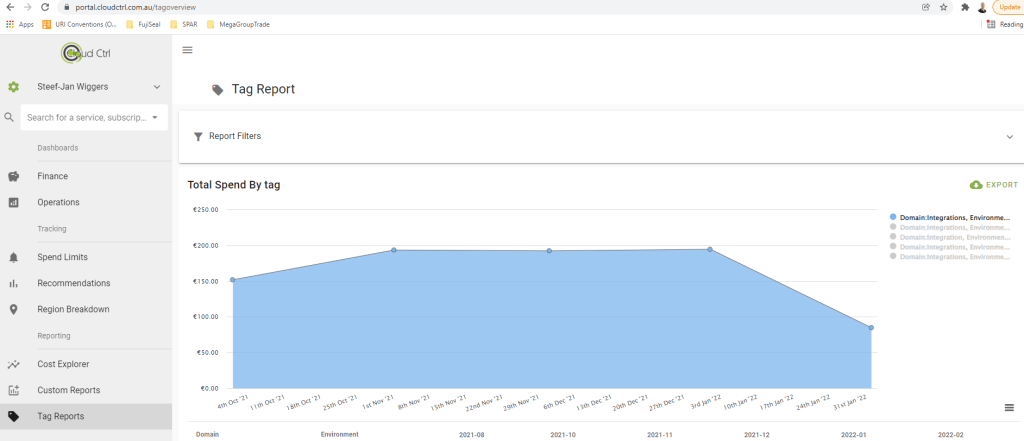
Next to policies tagging is another aspect of governance in Azure or any cloud platform. With tags, you can assign helpful information to any resource within your cloud infrastructure – usually information not included in the name of available in the overview of the resource. Tagging is critical for cost management, operations, and management of resources. More details on how to apply them are available in the decision guide.

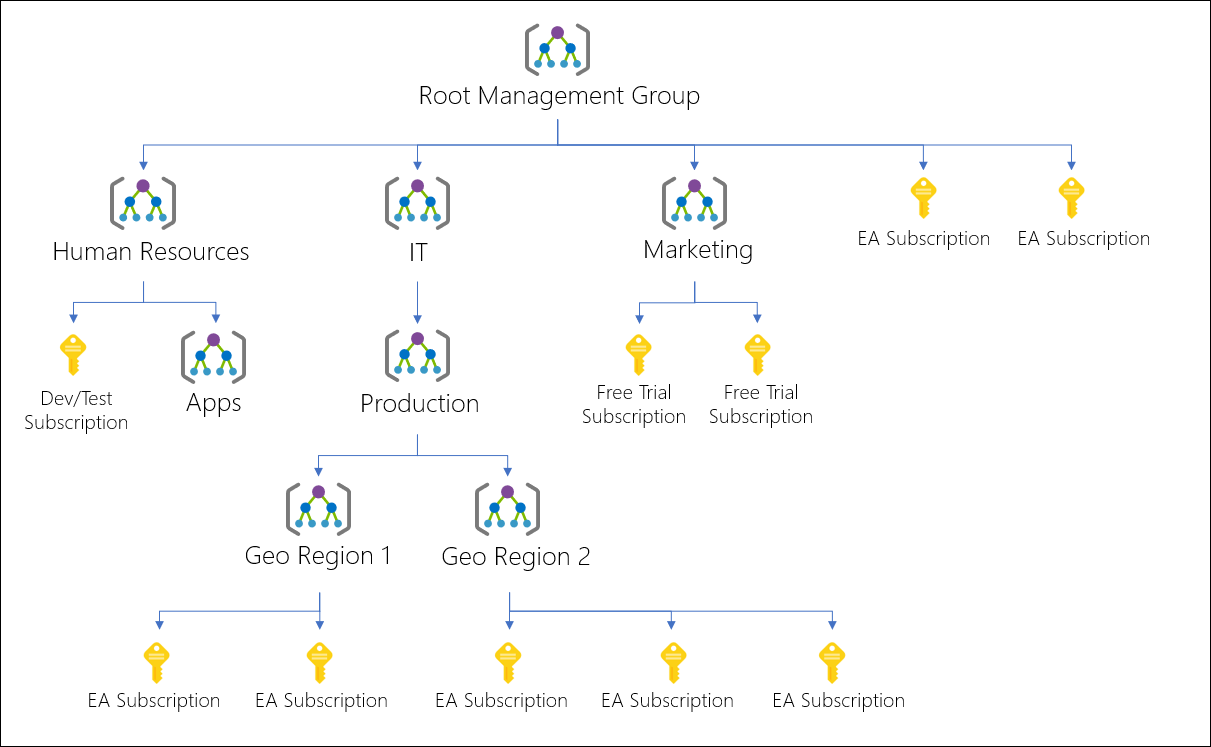
If you work at a company with many subscriptions, or the customer you work for does, you can leverage management groups –a level of scope above subscriptions. It provides a way to organize subscriptions into containers and thus provide a logical structure. Moreover, you can apply specific governance conditions with management groups as each subscription in a group inherits them.

Diagram of a sample management group hierarchy.

Source: https://docs.microsoft.com/en-us/azure/governance/management-groups/overview

More details on management groups are available on the GitHub page.

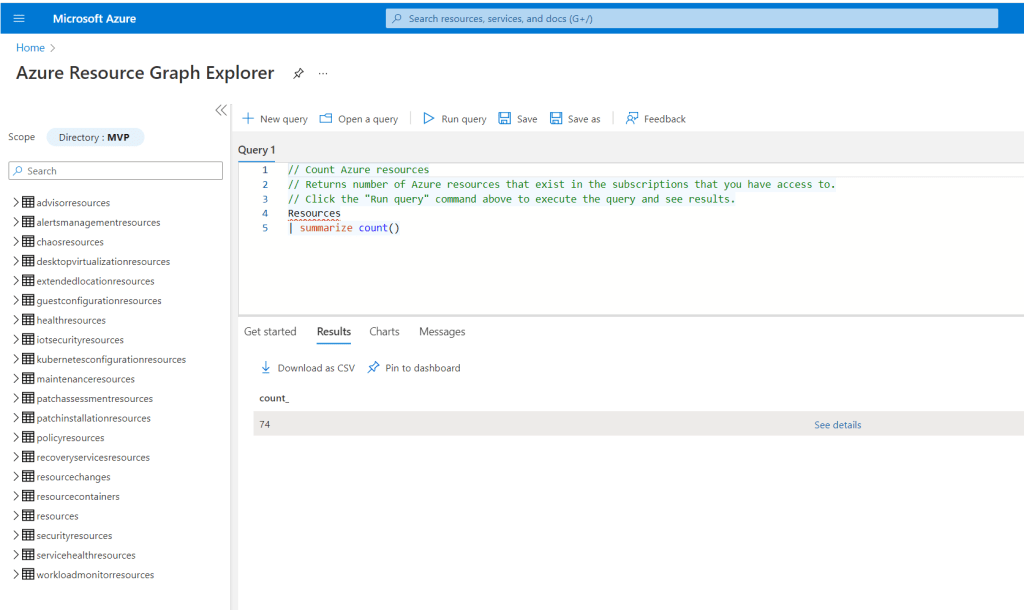
Another intriguing service is the Azure Resource Graph, a capability in Azure to query, explore, and analyze your cloud resources. It includes an Explorer you can use in the Azure portal and can also be used programmatically through the Azure CLI, Azure PowerShell and Azure SDK for .NET.

You can use Graph Explorer to explore resources based on your governance requirements and assess the impact of applying policies in your environments. The query language is based on the Kusto query language used by Azure Data Explorer. More details are available on the GitHub page.

And lastly, Azure Blueprints can enable you to define a repeatable set of Azure resources that implements and adheres to an organization’s standards, patterns, and requirements. As a result, you can orchestrate the deployment of various resource templates and other artifacts such as the earlier mentioned policies, role assignments, ARM templates, and resource groups in a declarative way. With blueprints, you can consistently deploy predefined environments. Other public cloud providers offer blueprints as well: AWS Blueprints and GCP Blueprints. You can find more details on Azure blueprints on GitHub.

Cost Management

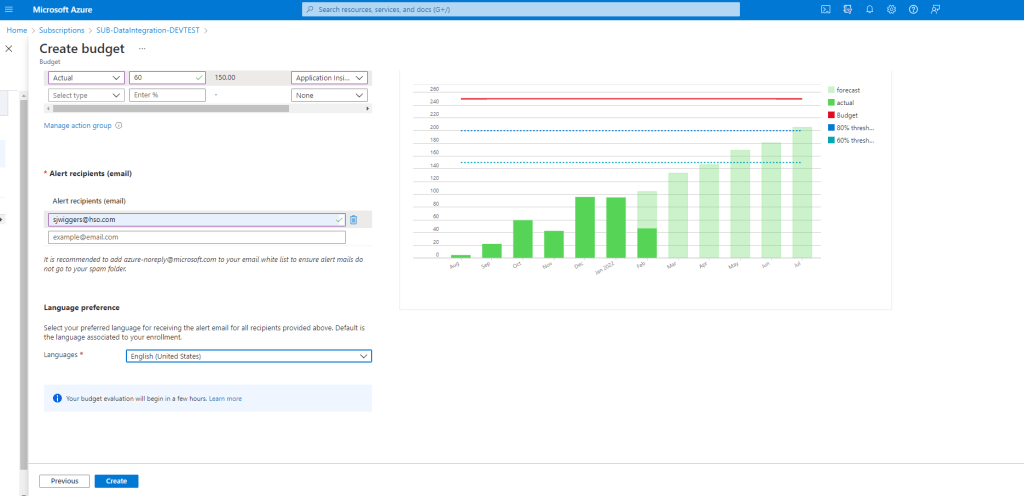
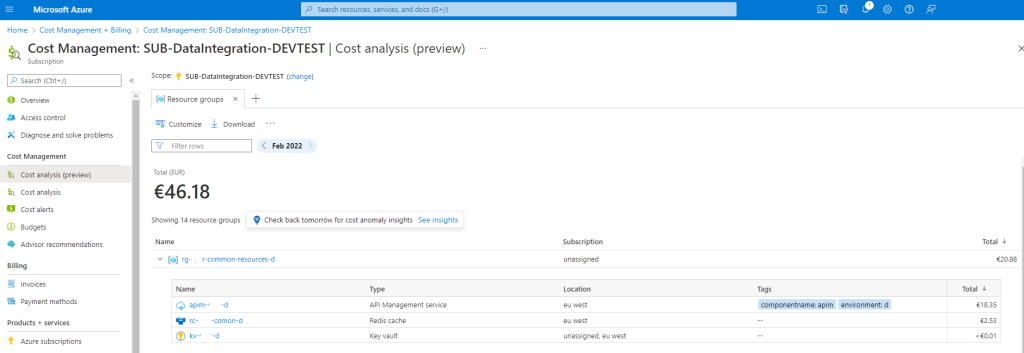
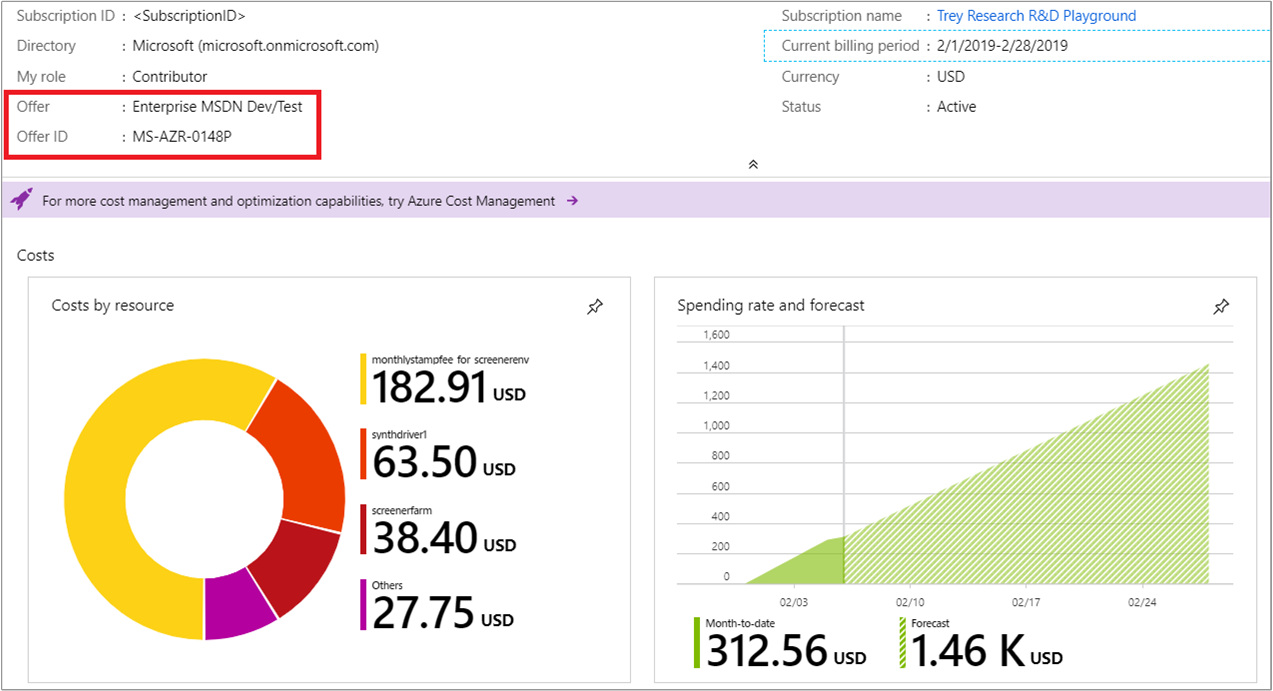
The cost management + billing service and features are available in any subscription in the Azure portal. It will allow you to do administrative tasks around billing, set spending thresholds, and proactively analyze azure cost generation. A key aspect is regarding cost control is to set up budgets at the beginning once a subscription before workloads land or resources are provisioned for the development of cloud solutions. Furthermore, once consumption of Azure resources starts, you can look at recommendations for cost optimizations. Moreover, Azure Advisor can help identify underutilized or unused resources to be optimized or shut down.

Example of the Subscription Overview tab showing Offer and Offer ID

Source: https://docs.microsoft.com/en-us/azure/cost-management-billing/costs/understand-cost-mgt-data

Security

An essential aspect of governance is security, for example, who gets access to what resource in Azure. A consistent way to set that up is by applying the earlier mentioned blueprint. Azure AD plays a role as well when you add accounts, service principles (an identity created for use with applications, hosted services, and automated tools to access Azure resources – similar to a service account on Windows), and app registrations (Application Object).

Azure AD is an Identity and Access solution with several features, such as conditional access, Multi-Factor Authentication (MFA), and Singel-SignOn (SSO) support. In addition, it is an essential service with regards to governance to provide access to the application (services) and people to Azure resources – and you want that consistent and accurate when it comes to who is responsible for what. And lastly, Microsoft provides best practices and guidance on this service you can look into.

Data Governance

Microsoft launched Purview into a public preview for data governance in December 2020, and it became generally available later in October 2021. With Azure Purview, the company delivers an Azure service that can help you understand what data your company has and provide means to manage the data’s compliance with privacy regulations and derive valuable insights.

Implementing Pipes and Filters Pattern using Azure Integrations Services

In my first blog post, I like to discuss implementing the pipes and filter pattern using Azure Integration Services (AIS).

A Pipe and Filter pattern uses multiple event queues and topics to streamline events’ flow across numerous cloud services. You can implement this by using queues or topics in a service bus namespace and Logic Apps or Azure Functions. Implementing this pattern with the mentioned services allows you to process messages in multiple stages like receiving, validating, processing, and delivering. Moreover, you can also opt for an event-driven approach using Logic Apps, Event Grid, and Functions.

The Pipe and Filter pattern is described in the Microsoft docs as a way to decompose complex processing into a series of separate elements that can be reused, providing improved performance, scalability, and reusability. Each element in the context of Azure Integration Services (AIS) can be either a Logic App or Azure Function and connected through a topic – which can be either a Service Bus Topic or an Event Grid Topic. The latter allows an event-driven approach to the pattern.

To process messages more timely, choosing the Event Grid is more efficient than using a service bus queue. Although you can select the queue or topic as a pipe with the pipe and filter pattern, having each filter subscribe and publish to them. However, it is less efficient as you will need to poll the queue or topic quite frequently.

Assume you receive multiple order files as a batch during the day, and these need to be processed as soon as possible in the shortest amount of time. You would need a way to receive or pick the files, validate them, process them, and subsequently deliver them to one or more sub-systems or locations. In the diagram below, we outlined the scenario.

Pipes and filter pattern implementation diagram

In the scenario, the Logic App function as on- and off-ramp receiving and sending data. The benefit of leveraging Logic Apps for data transport is its versatility in connectors. By leveraging the out-of-the-box connectors, you can consistently use a standard connector, in this case, Secure File Transport (SFTP).

Next, the functions will act as single processing units, i.e., one will store the data, including adding instance properties (context). Finally, another is triggered because the files are stored as a blob in a storage container (blobCreated Event). The chaining of the functions is done through the event mechanism – each storing of a blob results in an event (blobCreated) that another function can subscribe to. And lastly, a Logic App can be triggered to deliver the processed file. Moreover, multiple Logic Apps could be activated to deliver the file to various locations using various connectors if necessary.

The benefit of using functions is that you can have them scaled automatically (and thus also have elasticity) using Serverless mode (consumption) as a hosting option. Or, if you need more compute you can choose premium or dedicated plans. And by adding more compute, the performance of processing the files can be increased.

With the implementation of the pipes and filter pattern described above, you can see that you could easily reuse components (functions), add or remove components or shift around if necessary – hence you also have flexibility (agility). As described in the enterprise integration pipe and filter pattern with the context of the implementation:

Each filter (Function) exposes a straightforward interface (Binding): it receives messages on the inbound pipe (Event Grid Topic), processes the message, and publishes the results to the outbound pipe (Storage Container). The pipe (Event Grid Topic) connects one filter to the next, sending output messages from one filter to the next. Because all components use the same external interface, they can be composed into different solutions by connecting the components to other pipes. We can add new filters, omit existing ones or rearrange them into a new sequence — all without changing the filters themselves. The connection between filter and pipe is sometimes called port. Each filter component has one input port (Event Grid Topic) and one output port (Storage Account) in the basic form.

To summarize, the pipe and filter pattern brings the following benefits:

  • loose and flexible coupling of components (filters)
  • flexibility as it allows filters to be changed without modifications to other filters
  • parallel processing
  • reusability as each component (filter) can be called and used repeatedly

Note that it is less suitable when there are too many components (filters) concerning performance. Individually, the components – functions in our example can be tuned using the available hosting options – however, the sum of all the components determines the overall performance. Furthermore, the pattern is not suitable for interactive systems or long-running processes.

And lastly, with the pipe and filter pattern, there are also some challenges or considerations when implementing it according to the Microsoft documentation. For example, it mentions complexity when filters are distributed across servers. However, in our example, every component is presumably in the same Azure region, and messages are persisted in storage, benefiting from the built-in redundancy (reliability is available as well).

Finally, again in our example, when a message fails to reprocess, it is an option to reprocess it (retry); however, it depends on whether the message has to be reprocessed or dropped in a different container in the storage account. And when that happens, it is up to how monitoring and notifications are set up to troubleshoot and correct the error.