Digital Destiny: Navigating Europe’s Sovereignty Challenge – A Framework for Control

With the geopolitical changes since Trump took office, I’ve been following developments in digital sovereignty and have seen the industry’s response to Europe’s strategic demands through various InfoQ news items.

Today, Europe and the Netherlands find themselves at a crucial junction, navigating the complex landscape of digital autonomy. The recent introduction of the EU’s new Cloud Sovereignty Framework is the clearest signal yet that the continent is ready to take back control of its digital destiny.

This isn’t just about setting principles; it’s about introducing a standardized, measurable scorecard that will fundamentally redefine cloud procurement.

The Digital Predicament: Why Sovereignty is Non-Negotiable

The digital revolution has brought immense benefits, yet it has also positioned Europe in a state of significant dependency. Approximately 80% of our digital infrastructure relies on foreign companies, primarily American cloud providers. This dependence is not merely a matter of convenience; it’s a profound strategic vulnerability.

The core threat stems from U.S. legislation such as the CLOUD Act, which grants American law enforcement the power to request data from U.S. cloud service providers, even if that data is stored abroad. Moreover, this directly clashes with Europe’s stringent privacy regulations (GDPR) and exposes critical European data to external legal and geopolitical risk.

As we’ve seen with incidents like the Microsoft-ICC blockade, foreign political pressures can impact essential digital services. The possibility of geopolitical shifts, such as a “Trump II” presidency, only amplifies this collective awareness: we cannot afford to depend on foreign legislation for our critical infrastructure. The risk is present, and we must build resilience against it.

The Sovereignty Scorecard: From Principles to SEAL Rankings

The new Cloud Sovereignty Framework is the EU’s proactive response. It shifts the discussion from abstract aspirations to concrete, auditable metrics by evaluating cloud services against eight Sovereignty Objectives (SOVs) that cover legal, strategic, supply chain, and technological aspects.

The result is a rigorous “scorecard.” A provider’s weighted score determines its SEAL ranking (from SEAL-0 to SEAL-4, with SEAL-4 indicating full digital sovereignty). Crucially, this ranking is intended to serve as the definitive minimum assurance factor in government and public sector cloud procurement tenders. The Commission wants to create a level playing field where providers must tangibly demonstrate their sovereignty strengths.

The Duel for Dominance: Hyperscalers vs. European Federation

The framework has accelerated a critical duality in the market: massive, centralized investments by US hyperscalers versus strategic, federated growth by European alternatives.

Hyperscalers Adapt: Deepening European Ties

Global providers are making sovereignty a mandatory architectural and legal prerequisite by localizing their operations and governance.

  • AWS explicitly responded by announcing its EU Sovereign Cloud unit. This service is structured to ensure data residency and operational autonomy within Europe, explicitly targeting the SOV-3 (Data & AI Sovereignty: The degree of control customers have over their data and AI models, including where data is processed) criteria through physically and logically separated infrastructure and governance.
  • Google Cloud has also made significant moves, approaching digital sovereignty across three distinct pillars:
    • Data Sovereignty (focusing on control over data storage, processing, and access with features like the Data Boundary and External Key Management, EKM, where keys can be held outside Google Cloud’s infrastructure);
    • Operational Sovereignty (ensuring local partner oversight, such as the partnership with T-Systems in Germany); and
    • Software Sovereignty (providing tools to reduce lock-in and enable workload portability).To help organizations navigate these complex choices, Google introduced the Digital Sovereignty Explorer, an interactive online tool that clarifies terms, explains trade-offs, and guides European organizations in developing a tailored cloud strategy across these three domains. Furthermore, Google has developed highly specialized options, including Air-Gapped solutions for the defense and intelligence sectors, demonstrating a commitment to the highest levels of security and residency.
  • Microsoft has demonstrated a profound deepening of its commitment, outlining five comprehensive digital commitments designed to address sovereignty concerns:
    • Massive Infrastructure Investment: Pledging a 40% increase in European datacenter capacity, doubling its footprint by 2027.
    • Governance and Resilience: Instituting a “European cloud for Europe” overseen by a dedicated European board of directors (composed exclusively of European nationals) and backed by a “Digital Resilience Commitment” to contest any government order to suspend European operations legally.
    • Data Control: Completing the EU Data Boundary project to ensure European customers can store and process core cloud service data within the EU/EFTA.

European Contenders Scale Up

Strategic, open-source European initiatives powerfully mirror this regulatory push:

  • Virt8ra Expands: The Virt8ra sovereign cloud, which positions itself as a significant European alternative, recently announced a substantial expansion of its federated infrastructure. The platform, coordinated by OpenNebula Systems, added six new cloud service providers, including OVHcloud and Scaleway, significantly broadening its reach and capacity across the continent.
  • IPCEI Funding: This initiative, leveraging the open-source OpenNebula technology, is part of the Important Project of Common European Interest (IPCEI) on Next Generation Cloud Infrastructure and Services, backed by over €3 billion in public and private funding. This is a clear indicator that the vision for a robust, distributed European cloud ecosystem is gaining significant traction.

Sovereignty Redefined: Resilience and Governance

Industry experts emphasize that the framework embodies a more mature understanding of digital sovereignty. It’s not about isolation (autarky), but about resilience and governance.

Sovereignty is about how an organization is “resilient against specific scenarios.” True sovereignty, in this view, lies in the proven, auditable ability to govern your own digital estate. For developers, this means separating cloud-specific infrastructure code from core business logic to maximize portability, allowing the use of necessary hyper-scale features while preserving architectural flexibility.

The Challenge: Balancing Features with Control

Despite the massive investments and public commitments from all major players, the framework faces two key hurdles:

  • The Feature Gap: European providers often lack the “huge software suite” and “deep feature integration” of US hyperscalers, which can slow down rapid development. Advanced analytics platforms, serverless computing, and tightly integrated security services often lack direct equivalents at smaller providers. This creates a complex chicken-and-egg problem: large enterprises won’t migrate to European providers because they lack features, but local providers struggle to develop those capabilities without enterprise revenue.
  • Skepticism and Compliance Complexity: Some analysts fear the framework’s complexity will inadvertently favor the global giants with larger compliance teams. Furthermore, deep-seated apprehension in the community remains, with some expressing the fundamental desire for purely European technological solutions: “I don’t want a Microsoft cloud or AI solutions in Europe. I want European ones.” Some experts suggest that European providers should focus on building something different by innovating with European privacy and control values baked in, rather than trying to catch up with US providers’ feature sets.

My perspective on this situation is that achieving true digital sovereignty for Europe is a complex and multifaceted endeavor. While the commitments from global hyperscalers are significant, the underlying desire for independent, European-led solutions remains strong. It’s about strategic autonomy, ensuring that we, as Europeans, maintain ultimate control over our digital destiny and critical data, irrespective of where the technology originates.

The race is now on. The challenge for the cloud industry is to translate the high-level, technical criteria of the SOVs into auditable, real-world reality to achieve that elusive top SEAL-4 ranking. The battle for the future of Europe’s cloud is officially underway.

The Walking Skeleton and Pipes & Filters: Building Resilient Integration Architectures

I’ve spent quite some time in IT doing enterprise integration, and if there’s one truth that consistently holds up, it’s that a solid foundation prevents future disappointment or failure. We’ve all been there: a rush to deliver features on a shaky, unvalidated architecture, leading to months of painful, expensive refactoring down the line.

My experience in retail showed me that, and I was involved in rebuilding an integration platform. In the world of integration, where you’re constantly juggling disparate systems, multiple data formats, and unpredictable volumes, a solid architecture is paramount. Thus, I always try to build the best solution based on experience rather than on what’s written in the literature.

What is funny to me is that when I built the integration platform, I realized I was applying patterns like the Walking Skeleton for architectural validation and the Pipes and Filters pattern for resilient, flexible integration flows.

The Walking Skeleton caught my attention when a fellow architect at my current workplace brought it to my attention. And I realized that this is what I actually did with my team at the retailer. Hence, I should read some literature from time to time!

The Walking Skeleton: Your Architectural First Step

Before you write a line of business logic, you need to prove your stack works from end to end. The Walking Skeleton is precisely that: a minimal, fully functional implementation of your system’s architecture.

It’s not an MVP (Minimum Viable Product), which is a business concept focused on features; the Skeleton is a technical proof-of-concept focused on connectivity.

Why Build the Skeleton First?

  • Risk Mitigation: You validate your major components—UI, API Gateway, Backend Services, Database, Message Broker—can communicate and operate correctly before you invest heavily in complex features.
  • CI/CD Foundation: By its nature, the Skeleton must run end-to-end. This forces you to set up your CI/CD pipelines early, giving you a working deployment mechanism from day one.
  • Team Alignment: A running system is the best documentation. Everyone on the team gets a shared, tangible understanding of how data flows through the architecture.

Suppose you’re building an integration platform in the cloud (like with Azure). In that case, the Walking Skeleton confirms your service choices, such as Azure Functions and Logic Apps, which integrate with your storage, networking, and security layers. Guess what I am going to do again in the near future, I hope.

Leveraging Pipes and Filters Within the Skeleton

Now, let’s look at what that “minimal, end-to-end functionality” should look like, especially for data and process flow. The Pipes and Filters pattern is ideally suited for building the first functional slice of your integration Skeleton.

The pattern works by breaking down a complex process into a sequence of independent, reusable processing units (Filters) connected by communication channels (Pipes).

How They Map to Integration:

  1. Filters = Single Responsibility: Each Filter performs one specific, discrete action on the data stream, such as:
    • Schema Validation
    • Data Mapping (XML to JSON)
    • Business Rule Enrichment
    • Auditing/Logging
  2. Pipes = Decoupled Flow: The Pipes ensure data flows reliably between Filters, typically via a message broker or an orchestration layer.

In a serverless environment (e.g., using Azure Functions for the Filters and Azure Service Bus/Event Grid for the Pipes), this pattern delivers immense value:

  • Composability: Need to change a validation rule? You only update one small, isolated Filter. Need a new output format? You add a new mapping Filter at the end of the pipe.
  • Resilience: If one Filter fails, the data is typically held in the Pipe (queue/topic), preventing the loss of the entire transaction and allowing for easy retries.
  • Observability: Each Filter is a dedicated unit of execution. This makes monitoring, logging, and troubleshooting exact no more “black box” failures.

The Synergy: Building and Expanding

The real power comes from using the pattern within the process of building and expanding your Walking Skeleton:

  1. Initial Validation (The Skeleton): Select the absolute simplest, non-critical domain (e.g., an Article Data Distribution pipeline, as I have done with my team for retailers). Implement this single, end-to-end flow using the Pipes and Filters pattern. This proves that your architectural blueprint and your chosen integration pattern work together.
  2. Iterative Expansion: Once the Article Pipe is proven, validating the architectural choice, deployment, monitoring, and scaling, you have a template.
    • At the retailer, we subsequently built the integration for the Pricing domain, and by creating a new Pipe that reuses common Filters (e.g., the logging or basic validation Filters).
    • Next, we picked another domain by cloning the proven pipeline architecture and swapping in the domain-specific Filters.

You don’t start from scratch; you reapply a proven, validated template across domains. This approach dramatically reduces time-to-market and ensures that every new domain is built on a resilient, transparent, and scalable foundation.

My advice, based on what I know now and my experience, is not to skip the Skeleton. And don’t build a monolith inside it. Start with Pipes and Filters and Skeleton for a future-proof, durable architecture for enterprise integration when rebuilding an integration platform in Azure.

What architectural pattern do you find most useful when kicking off a new integration project? Drop a comment!

AWS Shifts to a Credit-Based Free Plan, Aligning with Azure and GCP

AWS is officially moving away from its long-standing 12-month free tier for new accounts. The new standard, called the Free Account Plan, is a credit-based model designed to eliminate the risk of unexpected bills for new users.

With this new plan, you get:

  • A risk-free environment for experimenting and building proofs of concept for up to six months.
  • A starting credit of $100, with the potential to earn another $100 by completing specific exploration activities, such as launching an EC2 instance. This means you can get up to $200 in credits to use across eligible services.
  • The plan ends after six months or once your credits are entirely spent, whichever comes first. After that, you have a 90-day window to upgrade to a paid plan and restore access to your account and data.

This shift, as Principal Developer Advocate Channy Yun explains, allows new users to get hands-on experience without cost commitments. However, it’s worth noting that some services typically used by large enterprises won’t be available on this free plan.

While some may see this as a step back, I tend to agree with Corey Quinn’s perspective. He writes that this is “a return to product-led growth rather than focusing on enterprise revenue to the exclusion of all else.” Let’s face it: big companies aren’t concerned with the free tier. But for students and hobbyists, who can be seen as the next generation of cloud builders, a credit-based, risk-free sandbox is a much more attractive proposition. The new notifications for credit usage and expiration dates are a smart addition that provides peace of mind.

How the New Plan Compares to Other Hyperscalers

A helpful plan for those who like to experiment on AWS, I think. Yet, other hyperscalers like Azure and GCP offer similar plans too. Microsoft Azure and Google Cloud Platform (GCP) have long operated on credit-based models.

  • Azure offers a different model: $200 in credits for the first 30 days, supplemented by over 25 “always free” services and a selection of services available for free for 12 months.
  • GCP provides a 90-day, $300 Free Trial for new customers, which can be applied to most products, along with an “Always Free” tier that gives ongoing access to core services like Compute Engine and Cloud Storage up to specific monthly limits.

This alignment among the major cloud providers highlights a consensus on the best way to attract and onboard new developers.

Microsoft also offers $100 in Azure credits through Azure for students. Note that the MSDN credits are typically a monthly allowance tied to a specific Visual Studio subscription, and the student credits are a lump sum for a particular period (e.g., 12 months), as I believe these different models can be confusing.

Speaking of other cloud providers, my own experience with Azure is an excellent example of how these credit models can be beneficial. I enjoy credits for Azure because of my MVP benefits, and through MSDN subscriptions, one has a monthly $150 in credits. These are different options from the general one I mentioned earlier. Anyway, there are ways to access services provided by the three big hyperscalers that allow you to get hands-on experience in combination with their documentation and what you can find in public repos.

In general, when you like to learn more about Azure, AWS, or GCP, the following table shows the most straightforward options:

Cloud HyperscalerFree CreditsDocumentationRepo (samples)
AzureAzure Free AccountMicrosoft LearnAzure Samples · GitHub  
AWSAWS Free TierAWS DocumentationAWS Samples · GitHub
GCPGCP Free TrialGoogle Cloud DocumentationGoogle Cloud Platform · GitHub

Digital Destiny: Navigating Europe’s Sovereignty Challenge

During my extensive career in IT, I’ve often seen how technology can both empower and entangle us. Today, Europe and the Netherlands find themselves at a crucial junction, navigating the complex landscape of digital sovereignty. Recent geopolitical shifts and the looming possibility of a “Trump II” presidency have only amplified our collective awareness: we cannot afford to be dependent on foreign legislation when it comes to our critical infrastructure.

In this post, I will delve into the threats and strategic risks that underpin this challenge. We’ll explore the initiatives being undertaken at both the European and Dutch levels, and crucially, what the major U.S. Hyperscalers are now bringing to the table in response.

The Digital Predicament: Threats to Our Autonomy

The digital revolution has certainly brought unprecedented benefits, not least through innovative Cloud Services that are transforming our economy and society. However, this advancement has also positioned Europe in a state of significant dependency. Approximately 80% of our digital infrastructure relies on foreign companies, primarily American cloud providers, including Amazon Web Services (AWS), Microsoft Azure, and Google Cloud. This reliance isn’t just a matter of convenience; it’s a strategic vulnerability.

The Legal Undercurrent: U.S. Legislation

One of the most persistent threats to European digital sovereignty stems from American legislation. The CLOUD Act (2018), an addition to the Freedom Act (2015) that replaced the Patriot Act (2001), grants American law enforcement and security services the power to request data from American cloud service providers, even if that data is stored abroad.

Think about it: if U.S. intelligence agencies can request data from powerhouses like AWS, Microsoft, or Google without your knowledge, what does this mean for European organizations that have placed their crown jewels there? This directly clashes with Europe’s stringent privacy regulations, the General Data Protection Regulation (GDPR), which sets strict requirements for the protection of personal data of individuals in the EU.

While the Dutch National Cyber Security Centre (NCSC) has stated that, in practice, the chance of the U.S. government requesting European data via the CLOUD Act has historically been minimal, they also acknowledge that this could change with recent geopolitical developments. The risk is present, even though it has rarely materialized thus far.

Geopolitics: The Digital Chessboard

Beyond legal frameworks, geopolitical developments pose a very real threat to our digital autonomy. Foreign governments may impose trade barriers and sanctions on Cloud Services. Imagine scenarios where tensions between major powers lead to access restrictions for essential Cloud Services. The European Union or even my country cannot afford to be a digital pawn in such a high-stakes game.

We’ve already seen these dynamics play out. In negotiations for a minerals deal with Ukraine, the White House reportedly made a phone call to stop the delivery of satellite images from Maxar Technologies, an American space company. These images were crucial for monitoring Russian troop movements and documenting war crimes.

Another stark example is the Microsoft-ICC incident, where Microsoft blocked access to email and Office 365 services for the chief prosecutor of the International Criminal Court in The Hague due to American sanctions. These incidents serve as powerful reminders of how critical external political pressures can be in impacting digital services.

Europe’s Response: A Collaborative Push for Sovereignty

Recognizing these challenges, both Europe and the Netherlands are actively pursuing initiatives to bolster digital autonomy. It’s also worth noting how major cloud providers are responding to these evolving demands.

European Ambitions:

The European Union has been a driving force behind initiatives to reinforce its digital independence:

  • Gaia-X: This ambitious European project aims to create a trustworthy and secure data infrastructure, fostering a federated system that connects existing European cloud providers and ensures compliance with European regulations, such as the General Data Protection Regulation (GDPR). It’s about creating a transparent and controlled framework.
  • Digital Markets Act (DMA) & Digital Services Act (DSA): These legislative acts aim to regulate the digital economy, fostering fairer competition and greater accountability from large online platforms.
  • Cloud and AI Development Act (proposed): This upcoming legislation seeks to ensure that strategic EU use cases can rely on sovereign cloud solutions, with the public sector acting as a crucial “anchor client.”
  • EuroStack: This broader initiative envisions Europe as a leader in digital sovereignty, building a comprehensive digital ecosystem from semiconductors to AI systems.

Crucially, we’re seeing tangible progress here. Virt8ra, a significant European initiative positioning itself as a major alternative to US-based cloud vendors, recently announced a substantial expansion of its federated infrastructure. The platform, which initially included Arsys, BIT, Gdańsk University of Technology, Infobip, IONOS, Kontron, MONDRAGON Corporation, and Oktawave, all coordinated by OpenNebula Systems, has now been joined by six new cloud service providers: ADI Data Center Euskadi, Clever Cloud, CloudFerro, OVHcloud, Scaleway, and Stackscale. This expansion is a clear indicator that the vision for a robust, distributed European cloud ecosystem is gaining significant traction.

Dutch Determination:

The Netherlands is equally committed to this journey:

  • Strategic Digital Autonomy and Government-Wide Cloud Policy: A coalition of Dutch organizations has developed a roadmap, proposing a three-layer model for government cloud policy that advocates for local storage of state secret data and autonomy requirements for sensitive government data.
  • Cloud Kootwijk: This initiative brings together local providers to develop viable alternatives to hyperscaler clouds, fostering homegrown digital infrastructure.
  • “Reprogram the Government” Initiative: This initiative advocates for a more robust and self-reliant digital government, pushing for IT procurement reforms and in-house expertise.
  • GPT-NL: A project to develop a Dutch language model, strengthening national strategic autonomy in AI and ensuring alignment with Dutch values.

Hyperscalers and the Sovereignty Landscape:

The growing demand for digital sovereignty has prompted significant responses from major cloud providers, demonstrating a recognition of European concerns:

  • AWS European Sovereign Cloud: AWS has announced key components of its independent European governance for the AWS European Sovereign Cloud.
  • Microsoft’s Five Digital Commitments: Microsoft recently outlined five significant digital commitments to deepen its investment and support for Europe’s technological landscape.

These efforts from hyperscalers highlight a critical balance. As industry analyst David Linthicum noted, while Europe’s drive for homegrown solutions is vital for data control, it also prompts questions about access to cutting-edge innovations. He stresses the importance of “striking the right balance” to ensure sovereignty efforts don’t inadvertently limit access to crucial capabilities that drive innovation.

However, despite these significant investments, skepticism persists. There is an ongoing debate within Europe regarding digital sovereignty and reliance on technology providers headquartered outside the European Union. Some in the community express doubts about how such companies can truly operate independently and prioritize European interests, with comments like, “Microsoft is going to do exactly what the US government tells them to do. Their proclamations are meaningless.” Others echo the sentiment that “European money should not flow to American pockets in such a way. Europe needs to become independent from American tech giants as a way forward.” This collective feedback highlights Europe’s ongoing effort to develop its own technological capabilities and reduce its reliance on non-European entities for critical digital infrastructure.

My perspective on this situation is that achieving true digital sovereignty for Europe is a complex and multifaceted endeavor, marked by both opportunities and challenges. While the commitments from global hyperscalers are significant and demonstrate a clear response to European demands, the underlying desire for independent, European-led solutions remains strong. It’s not about outright rejection of external providers, but about strategic autonomy – ensuring that we, as Europeans, maintain ultimate control over our digital destiny and critical data, irrespective of where the technology originates.

Azure Cosmos DB’s Latest Performance Features

As an earlier adopter of Azure Cosmos DB, I have always been following the developments of this service and have built up my experience myself with leveraging it for monitoring purposes (a recent one is presented at Azure Cosmos DB Conf 2023 – Leveraging Azure Cosmos DB for End-to-End Monitoring of Retail Processes).

Azure Cosmos DB

For those unfamiliar with Azure Cosmos DB, Microsoft’s globally distributed, multi-model database service offers low-latency, scalable storage and querying of diverse data types. It allows developers to build applications with data access and high availability across regions. Its well-known counterpart is Amazon DynamoDB.

In this blog post, I like to point out some recent optimizations of the service around performance. Moreover, I have written an InfoQ news item recently on this as well.

Priority-based execution

One of the more recent features introduced in the service is priority-based execution, which is currently in public preview.  It allows users to define the priority of requests sent to Azure Cosmos DB. When the number of requests surpasses the configured Request Units per second (RU/s) limit, lower-priority requests are slowed down to prioritize the processing of high-priority requests, as specified by the user’s defined priority.

As mentioned in a blog post by Microsoft, this feature empowers users to prioritize critical tasks over less crucial ones in situations where a container surpasses its configured request units per second (RU/s) capacity. Less important tasks are automatically retried by clients using an SDK with the specified retry policy until they can be successfully processed.

With priority-based execution, you have the flexibility to allocate varying priorities to workloads operating within the same container in your application. This proves beneficial in numerous scenarios, including prioritizing read, write, or query operations, as well as giving precedence to user actions over background tasks like bulk execution, stored procedures, and data ingestion/migration.

Once accepted, a nomination form is available to access the feature and .NET SDK.

Hierarchical Partition Keys

In addition to Priority-based execution, the product group for Cosmos DB also introduced Hierarchical Partition Keys to optimize performance.

Hierarchical partition keys enhance Cosmos DB’s elasticity, particularly in scenarios where users utilize synthetic- or logical partition keys surpassing 20 GB of data. By employing up to three keys with hierarchical partitioning, users can effectively sub-partition their data, achieving superior data distribution and enabling greater scalability. Azure Cosmos DB automatically distributes the data among physical partitions, allowing logical partition prefixes to exceed the 20GB storage limit.

According to the documentation, the simplest way to create a container and specify hierarchical partition keys is using the Azure portal. 

For example, you can use hierarchical partition keys to partition data by tenant ID and then by item ID. This way, all items for a given tenant are stored together in the same physical partition. This can improve query performance by reducing the number of physical partitions that need to be queried. 

A more detailed explanation and use case for hierarchical keys in Azure Cosmos DB can be found in the blog post by Leonard Lobel. 

Burst Capacity Feature

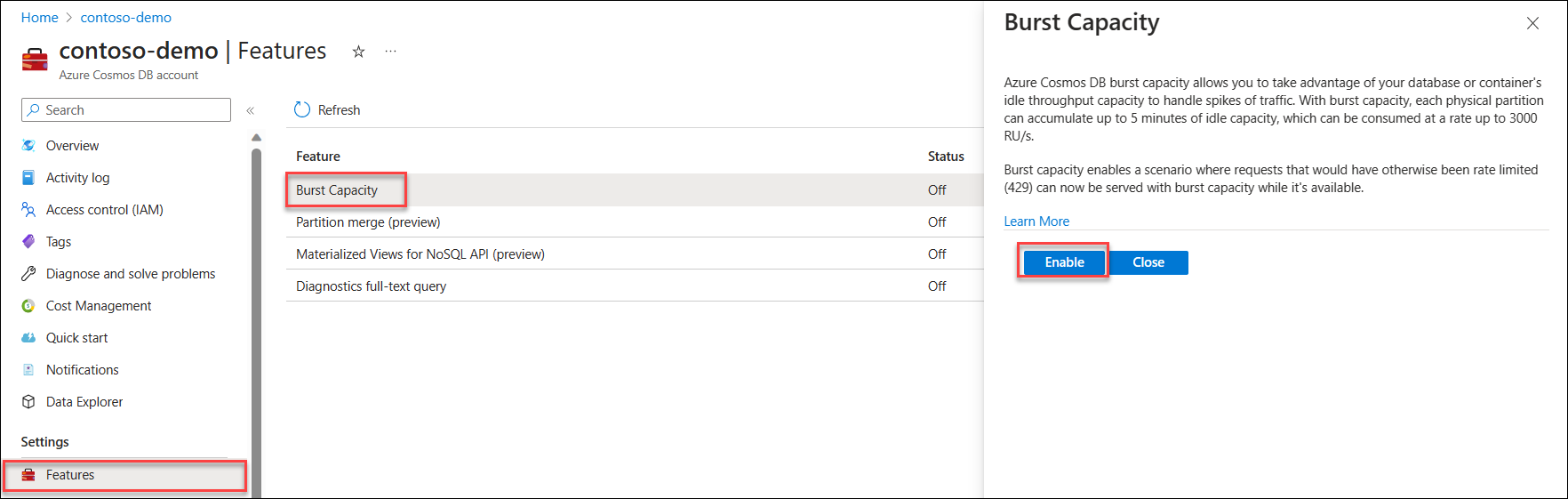
Lastly, the team also made the burst capacity feature for Azure Cosmos DB generally available (GA) to allow you to take advantage of your database or container’s idle throughput capacity to handle traffic spikes.   

Burst capacity allows each physical partition to accumulate up to 5 minutes of idle capacity, which can be utilized at a rate of up to 3000 RU/s. This feature is applicable to databases and containers utilizing manual or autoscale throughput, provided they have less than 3000 RU/s provisioned per physical partition.

To begin utilizing burst capacity, access the Features page within your Azure Cosmos DB account and enable the Burst Capacity feature. Please note that the feature may take approximately 15-20 minutes to become active once enabled.  

Enabling the burst capacity feature (Source: Microsoft Learn Bust Capacity)

According to the documentation, to use the feature, you need to consider the following: 

  • If your Azure Cosmos DB account is configured with provisioned throughput (manual or autoscale), burst capacity is not applicable. Burst capacity is specifically for serverless accounts.  
  • Additionally, burst capacity is compatible with Azure Cosmos DB accounts utilizing the API for NoSQL, Cassandra, Gremlin, MongoDB, or Table. 

Lastly, in case you are wondering what the difference between burst capacity and priority-based execution is, Jay Gordon, a Senior Cosmos DB program manager, explained that in the discussion of the blog post around these performance features:

The difference between burst capacity and execution based on priority lies in their impact on performance and resource allocation:

Burst capacity affects the overall throughput capacity of your Azure Cosmos DB container or database. It allows you to temporarily exceed the provisioned throughput to handle sudden spikes in workload. Burst capacity helps maintain low latency and prevent throttling during peak usage periods.

Execution based on priority determines the order in which requests are processed when multiple concurrent requests exist. Higher priority requests are prioritized and typically get faster access to resources for execution. This ensures that essential or time-sensitive operations are processed promptly, while lower-priority requests may experience slight delays.

“In terms of results, burst capacity and execution based on priority are independent. Utilizing burst capacity allows you to handle temporary workload spikes, whereas execution based on importance ensures that higher-priority requests are processed more promptly. These mechanisms work together to optimize performance and resource allocation in Azure Cosmos DB, but they serve different purposes“.

Conclusion

In conclusion, Azure Cosmos DB continues to evolve with new features designed to enhance performance and scalability. The priority-based execution, currently in public preview, enables users to prioritize critical tasks over less important ones when the request unit capacity is exceeded. This flexibility is further enhanced by introducing hierarchical partition keys, allowing optimal data distribution and larger scales in scenarios with substantial data. Additionally, the burst capacity feature, now generally available, provides an efficient way to handle traffic spikes by utilizing idle throughput capacity. Users can easily enable burst capacity through the Azure Cosmos DB account’s Features page, making it a valuable tool for serverless accounts.

Returning to Amazon, DynamoDB, the Cosmos DB counterpart on AWS, offers performance-optimizing capabilities. Concepts are similar.

New Pricing Plan and Enhanced Networking for Azure Container Apps in Preview

Microsoft recently announced a new pricing plan and enhanced networking for Azure Container Apps in public preview.

Azure Container Apps is a fully managed environment that enables developers to run microservices and containerized applications on a serverless platform. It is flexible and can execute application code packaged in any container without runtime or programming model restrictions.

Earlier Azure Container Apps had a consumption plan featuring a serverless architecture that allows applications to scale in and out on demand. Applications can scale to zero, and users only pay for running apps.

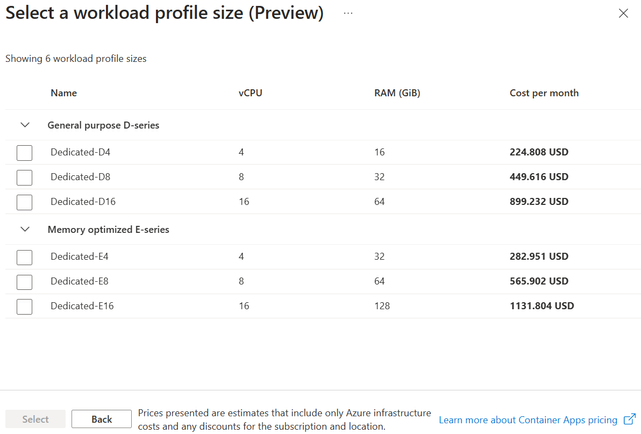
In addition to the consumption plan, Azure Container Apps now supports a dedicated plan, which guarantees single tenancy and specialized compute options, including memory-optimized choices. It runs in the same Azure Container Apps environment as the serverless Consumption plan and is referred to as the Consumption + Dedicated plan structure. This structure is in preview.

Mike Morton, a Senior Program Manager at Microsoft, explains in a Tech Community blog post the benefit of the new plan:

It allows apps or microservice components that may have different resource requirements depending on component purpose or development stack to run in the same Azure Container Apps environment. An Azure Container Apps environment provides an execution, isolation, and observability boundary that allows apps within it to easily call other apps in the environment, as well as provide a single place to view logs from all apps.

At the Azure Container Apps environment scope, compute options are workload profiles. The default workload profile for each environment is a serverless, general-purpose profile available as part of the Consumption plan. For the dedicated workload profile, users can select type and size, deploy multiple apps into the profile, use autoscaling to add and remove nodes and limit the scaling of the profile.

Source: https://techcommunity.microsoft.com/t5/apps-on-azure-blog/azure-container-apps-announces-new-pricing-plan-and-enhanced/ba-p/3790723

With Container Apps, one architect has another compute option in Azure besides App Service and Virtual Machines. Edwin Michiels, a Tech Customer Success Manager at Microsoft, answered in a LinkedIn post the difference between Azure Container Apps and Azure Apps Service, which offer similar capabilities:

In terms of cost, Azure App Service has a pricing model based on the number of instances and resources used, while Azure Container Instances and Azure Kubernetes Service are billed based on the number of containers and nodes used, respectively. For small to medium-sized APIs, Azure App Service may be a more cost-effective option, while for larger or more complex APIs, Azure Container Instances or Azure Kubernetes Service may offer more flexibility and cost savings.

The Consumption + Dedicated plan structure also includes optimized network architecture and security features that offer reduced subnet size requirements with a new /27 minimum, support for Azure Container Apps environments on subnets with locked-down network security groups and user-defined routes (UDR), and support on subnets configured with Azure Firewall or third-party network appliances.

The new pricing plan and enhanced networking for Azure Container Apps are available in the North Central US, North Europe, West Europe, and East US regions. Billing for Consumption and Dedicated plans is detailed on the Azure Container Apps pricing page.

Lastly, the new price plan and network enhancements are discussed and demoed in the latest Azure Container Apps Community Standup.

My Azure Security Journey so far

I like to travel, explore and admire new environments. Similarly, in my day-to-day job, I want to explore new technologies, look at architectural challenges with the solutions I design, and help engineers.

Exploring is my second nature; it’s my curiosity and desire to learn – experience new things. With Cloud Computing, many developments happen daily, including new services, updates, and learnings. I like that, and with my role at InfoQ, I can cover these developments through news stories. Moreover, in my day job, I deal with cloud computing daily, specifically Microsoft Azure and integrating systems through Integration Services.

Exams

An area that got my attention this year was governance and security.  I wrote two blogs this year – a blog on secret management in the cloud and one titled a high-level view of governance. In addition, I started exploring resources from Microsoft on Governance and Security on their learning platform. And recently, I planned to prepare for some certifications for that matter with:

  • Exam SC-900: Microsoft Security, Compliance, and Identity Fundamentals
  • Exam AZ-500: Microsoft Azure Security Technologies
  • Exam SC-100: Microsoft Cybersecurity Architect

I passed the first, and the other two are scheduled for Q1 in 2023.

The goal of preparing for the exams is learning more about security, as its an important aspect when designing integration solutions in Azure.

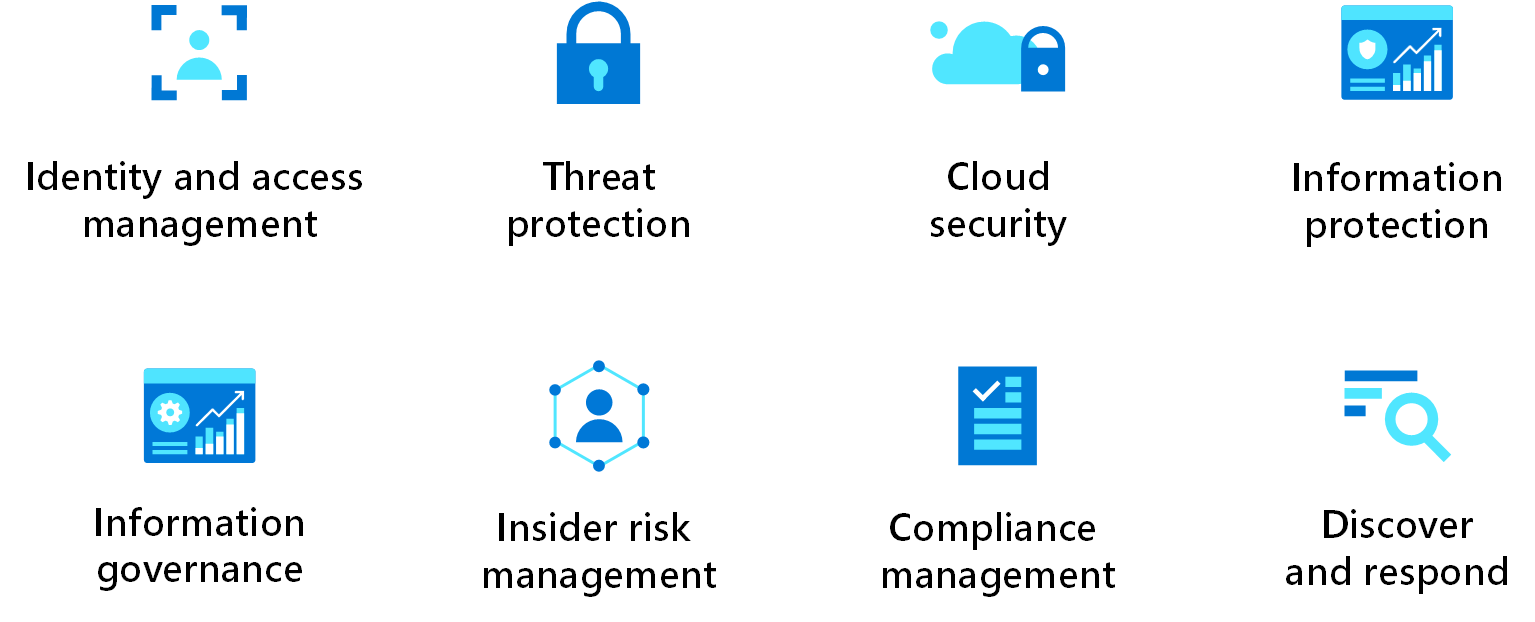
Screenshot showing security design areas.

Source: https://learn.microsoft.com/en-us/azure/architecture/framework/security/overview

Another good source is the well-architected framework: Security Pillar.

New Items

The dominant three public cloud providers, Microsoft, AWS, and Google, provide services and guidance on security on their platforms. As a cloud editor at InfoQ, I sometimes cover stories on their products, open-source initiatives, and architecture. Here’s a list of security and governance-related news items I wrote in 2022:

Source: https://github.com/ine-labs/AzureGoat#module-1

Books

Next to writing news items, my day-to-day job, traveling, and sometimes running, I read books. The security-related books I read and am reading are:

Another one I might get is a recent book published by APress titled: Azure Security For Critical Workloads: Implementing Modern Security Controls for Authentication, Authorization, and Auditing by Sagar Lad.

Microsoft Valuable Professional Security

Another thing I recently learned is that there is a new award category within the MVP program: Azure Security. The focus for this area lies on contributions in:

  • Cloud Security in general on Azure, think about Microsoft Azure services like Key Vault, Firewall, Policy, and concepts like Zero Trust Model and Defense in Depth.
  • Identity & Access, including management, hence Azure Active Directory (AAD) or, in general, Microsoft Entra.
  • Security Information and Event Management (SIEM) & Extended Detection and Response (XDR) – think about Microsoft’s product Sentinel.

Lastly, I am looking forward to 2023, which will bring me new challenges, destinations to travel to, and hopefully, success in passing the exams I have lined up for myself.

My Experience with Microsoft Excel During IT Projects

During my extensive career in IT, I often ran into Microsoft Excel. One of my first projects was leveraging Excel to create documentation for a telco for site surveys. I build a solution with Visual Basic for Applications, a programming language for Excel, and all the other Microsoft Office programs like Word and PowerPoint. With VBA, I could generate multiple worksheets in a Workbook filled with static and dynamic data – from a user’s input or configuration file. Once populated with data and rendered, the Workbook was converted to a Portable Document Format (PDF).

Over the last couple of years, I had other projects involving Excel. In this post, I will dive into the details of implementations (use cases) concerning Excel Workbooks. One project involved processing Excel files in a Container running on an Azure Kubernetes Service (AKS) cluster, the other generating an Excel Workbook for reporting purposes orchestrated by an Azure Logic App.

Use Case – Processing an Excel Workbook in a Container

The use case was as follows. In short, I was working on a project for a client a few years ago that required processing a standardized Excel template that their customers could provide for enrichment. The data in the excel file needed to end in a database for further processing (enrichment) so that it could be presented back to them.  The diagram below shows the process of a customer uploading an Excel file via an API. The API would store the Excel in an Azure storage container and trigger code inside a container responsible for processing (parsing the Excel to JSON). The second container had code persist the data in SQL Azure.

Use Case 1

The code snippet (as an example) responsible for processing the Excel file:

For creating the Excel Workbook and its sheet with data, I found the EPPlus library, a spreadsheet library for the .NET framework and .NET core. In the project, I imported the EPPlus NuGet package – specifically, I used the ExcelPackage class.

Now let’s move on to the second use case.

Use Case – Generating an Excel Report in Azure

In a recent project for another customer, I had to generate a report of products inside D365 that needed to be an Excel File (a workbook containing a worksheet with data). The file had to be written to an on-premises file share to allow the target system to consume it. The solution I built was using a Logic App to orchestrate the project of generating the Excel file.

Below you see a diagram visualizing the steps from triggering a package in D365 until the writing of the Excel file in a file share on-premises.

Use Case 2

The steps are:

  1. Logic App triggering a package in D365 (schedule trigger).
  2. Executing the package to retrieve and export data to a SQL Azure Database.
  3. Query by the same Logic App that triggered the package to retrieve the data from the SQL Azure Database.
  4. Passing the data to (the result of the query) to an Azure Function, which will create an Excel Workbook with one sheet containing the data in a given format. The function will write the Excel to an Azure Storage container.
  5. Subsequently, the Logic App will download and write the file to the on-premises file share (leveraging the On-Premises Data Gateway – ODPGW).

The sequence diagram below shows the flow (orchestration) of the process.

Sequence diagram

And below is a part of the Logic App workflow definition resembling the sequence diagram above.

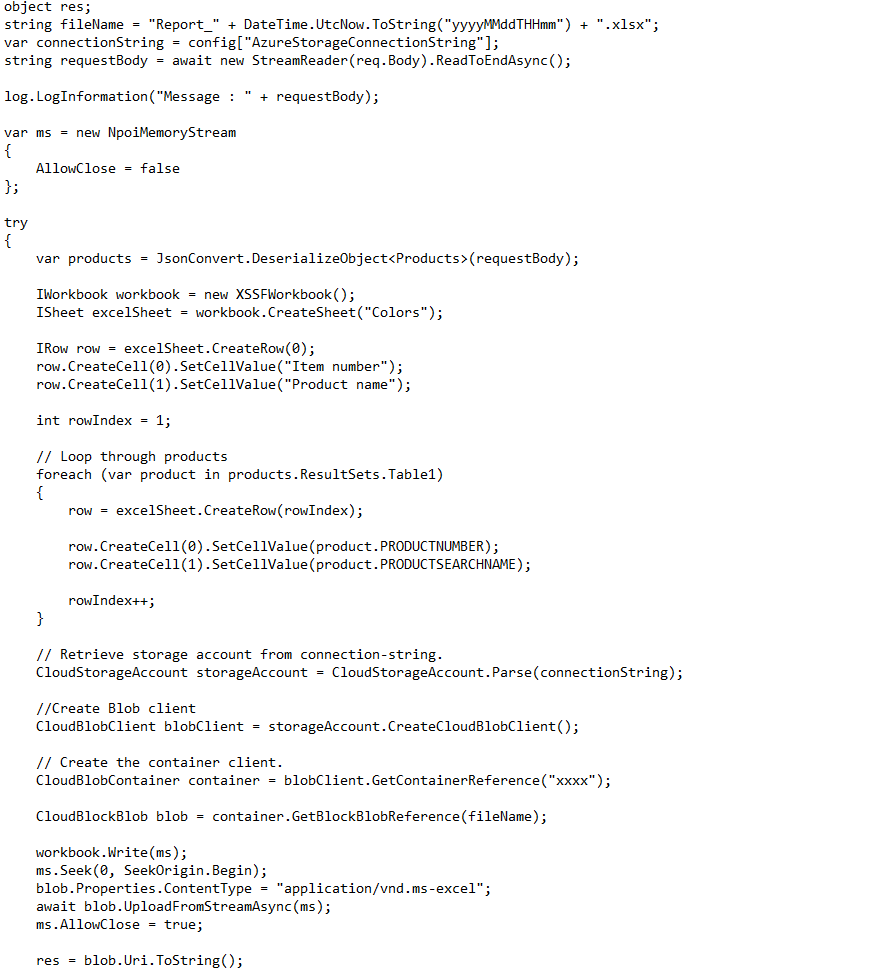
The code snippet (as an example) in the Azure Function responsible for creating the Excel file:

For the creation of the Excel Workbook and sheet with data, I used NPOI – an open-source project which can help you read/write XLS, DOC, and PPT file extensions. In Visual Studio, I imported NPOI NuGet Package. The package covers most of the features of Excel like styling, formatting, data formulas, extracting images, etc. In addition, it does not require the presence of Microsoft Office. Furthermore, I used the StorageAccountClass to write the Excel file.

Conclusion

Microsoft Excel is a popular product available for decades and used by millions of people ranging from businesses heavily relying on Excel to home users for basic administration. Moreover, in IT, Excel is used in many scenarios such as project planning, environment overviews, project member administration, reporting, etc. As said earlier, I have encountered Microsoft Excel various times in my career and built solutions involving the product. The two use-cases are examples of that.

In the first example, I faced a challenge finding a library that supported .NET Core 2.0. I found EPPlus, which did the job for us after experimenting with it first. In the second example, the cost and simplicity were the benefits of using the NPOI library. There were constraints in the project to use solutions with a cost (subscription-based or one-off). Furthermore, the solution proved to be stable enough to generate the report.

Note that the libraries I found are not the only ones available to work with Excel. For instance, SpreadsheetGear, and others, which are listed here. In Logic Apps, you can find connectors that can do the job for you, such as CloudMersive (API you connect to convert, for instance, CSV to Excel).

I do feel with code you have the most flexibility when it comes to dealing with Excel. A standard, of-the-shelve can do the job for you, however, cost (licensing) might be involved or other considerations. What you choose in your scenarios depends on the given context and requirements.

The value of having a Third-party Monitoring solution for Azure Integration Services

My day-to-day job focuses on enterprise integration between systems in the cloud and/or on-premises. Currently, it involves integration with D365 Finance and Operations (or Finance and Supply Change Management). One aspect of the integrations is monitoring. When a business has one or more Azure Integration Service running in production, the operation aspect comes into play. Especially integrations that support crucial business processes. The operations team requires the correct procedures, tools, and notifications (alerts) to run these processes. Procedures and receiving notifications are essential; however, team members need help identifying issues and troubleshooting. Azure provides tools, and so do third-party solutions. This blog post will discuss the value of having third-party monitoring in place, such as Serverless360.

Serverless360

Many of you who read blogs on Serverless360 know what the tool is. Moreover, it is a service hosted as a Software as a Service (SaaS). Therefore, operation teams can require access once a subscription is acquired or through a trial. Subsequently, they can leverage the primary business application, business activity monitoring, and documenter feature within the service. We will briefly discuss each feature and its benefits and value in the upcoming paragraphs.

Business Applications

A team can configure, and group integration components with the business applications feature a so-called “Business Application” to monitor. It does not matter where the resources reside – within one or more subscriptions/resource groups.

Business Application

The overview shown above is the grouping of several resources belonging to an integration solution. In one blink of an eye, a team member of the operations team can see the components’ state and potential issues that need to be addressed. Can the same be done in Azure with available features such as Azure Monitor, including components like Application Insights? Yes, it can be done. However, it takes time to build a dashboard. Furthermore, when operations are divided into multiple tiers, first-tier support professionals might not be familiar with the Azure Portal. In a nutshell, an overview provided by Business Application is not present in Azure out-of-the-box.

As Lex Hegt, Lead Product Consultant at BizTalk360, points out:

Integration solutions can span multiple technologies, resource groups, tags, and even Azure subscriptions. With the Azure portal having the involved components in all those different places, it is hard to keep track of the well-being of those components. Serverless360 helps you utilize the concept of Business Applications. A Business Application is a container to which you can add all the components that belong to the same integration. Once you have added your components to a Business Application, you can set up monitoring for those components, provide access permissions, and administer them.

The Business Application brings another feature that provides an overview of the integration components and dependencies. You might be familiar with the service map feature in Application Insights on a more fine-grained level. The service map in Serverless360 is intended to show the state of each component and dependency on a higher level.

Within a business application, the configuration of monitoring components is straightforward. By selecting the component and choosing the monitoring section, you can set thresholds of performance counters and set the state.

Performance Counters

The value of Business Applications is a quick view of the integrations state and the ability to dive into any issue quickly, leading to time-saving by spending far less time identifying the problem (see, for instance, Application Insights health check with Serverless360, and Integrating Log Analytics in Serverless360). With more time on their hand’s operations teams can focus on various other matters during a workday or shift. Furthermore, the ease of use of Business Applications doesn’t require support people in a first-tier support team to have a clear understanding and experience of the Azure portal.

Having a clear overview is one thing. However, it also helps operations teams get notifications or finetune metrics based on thresholds and only receive information when it matters. In addition, it’s essential to keep integrations operational when they support critical business processes, as any outage costs a significant amount of money.

Business Activity Monitoring

The second feature of Serverless360 is the end-to-end tracking capability called Business Activity Monitoring (BAM). The BAM feature organization can instrument their Azure resources that support integrations between systems. Through a custom connector and SDK, you can add tracking to Logic Apps and Azure Functions that are a part of your integration. A unique generated transaction instance-id in the first component will be carried forward to the subsequent stages in more functions and Logic Apps.

The operations team must do some work to leverage the BAM functionality. They need to set up the hosting of the BAM infrastructure, define the business process, instrument the business process and add monitoring (see, for instance, Azure Service Bus Logging with BAM – Walk-through). Once that is done, a clear view of the process and its stages are available.

Business Activitity Monitoring (BAM)

The benefit of the BAM feature is a concise overview of the configured business processes. Moreover, you get an overview of the complete process and potentially see where things go wrong.

Azure Documenter

The final feature Serverless360 offers the Azure Documenter is intended to generate documentation. Operations teams can generate documentation for the subscription that contains the integrations with the documenter. It is good to have a dedicated subscription for integration solutions to govern better and manage Azure resources.

When operations teams like to generate documentation, they can choose between different templates, storing of the document, and billing range.

Azure Documenter

The benefit of having documentation of the integrations in a subscription is having a clear overview of the components, details, and costs (consumption). While the Azure portal offers a similar capability, you will have to go to the Cost management and billing to see consumption and cost, Azure Advisor, and other places. Furthermore, there is no feature to generate documentation to help report the Azure resources’ state.

Report Azure Documenter

The value of the Azure Documenter is the flexibility for generating documentation on a different level of granularity. Furthermore, by frequently running the documenter, you can spot differences like an unexpected increase in cost provide executive reports and information for your knowledge base for integrations.

Conclusion

Features and benefits of Serverless360 have been outlined in this blog post. Of course, there are many more features. Yet, we focused on the most significant one that provides Operations teams the most value. That is a clear overview of the state of integrations in a single-pane-of-glass and the ability to quickly drill down into integration components and spot issues at a fine-grained level. Furthermore, Business Activity Monitoring and Azure Documenter provide end-to-end tracking and generated documentation.

Serverless 360 Monitoring

Serverless360 offers an off-the-shelf product for monitoring not directly available in the Azure Portal. As an organization, you can decide whether to buy a product or build a custom solution, or both to fulfill monitoring requirements for integration solutions. Serverless360 can be the solution for organizations looking for a product to meet their needs. It has unique features which are not directly available in Azure or require a substantial investment to achieve.

For more details and Serverless360 in action, see the webinar of Michael Stephenson: Support Strategy for Event-Driven Integration Architectures and the latest features blog.

Should developers care about Azure Cost?

The days of prepurchasing a large amount of infrastructure are gone. Instead, in the Cloud, we deal with buying small units of resources at a low cost. As a result, developers have the freedom to provision resources and deploy their apps. They can spend company money at a click of a button or line of code. There is no longer a need to go through any procurement process.

Therefore you could ask the question: Should developers be aware of the running costs of their apps and belonging infrastructure? And also worry about SKU’s, dimensioning, and unattended resources? I would say yes, they should be aware. Depending on requirements, environments (dev, test, acceptance, and production), availability, security, test strategy, and so on, costs will accumulate. Having an eye on the cost from the start will prevent discussion when the bill is too high at the end of the month or lacks justifying of the chosen deployment of Azure resources. 

Fortunately, there are services and tools available to help you in the estimation of costs, monitoring, and analysis for cost optimization. Furthermore, you can help identify costs by applying tags to your Azure resources – important when costs of Azure resources in a subscription are shared over departments.

Azure Calculator

Microsoft provides a Cloud Platform called Azure containing over 100 services for its customers. They are charged for most of the services when consuming them. These charges (cost) can be estimated using the so-called ‘Pricing calculator.’

You can search for a product (service) with the pricing calculator and subsequently select it.

Azure Price Calculator

Next, a pop window on the right-hand side will appear, and you click on view. Finally, a window will appear with the options for, in this case, Logic Apps. You can select the region where you like to provision your product (service), and depending on hosting, other criteria specify what you like to consume. In addition, you can select what type of support you want and licensing model – and there is also a switch allowing you to see what the dev/test pricing is for the product.

Furthermore, if you want to estimate a solution consisting of multiple products, you can select all of them before specifying the consumption characteristics. The calculator will, in the end, show the accumulated costs for all products.

Other tabs in the calculator showcase sample scenarios to calculate the cost potential savings when already running resources in Azure and FAQs. And lastly, at the bottom, you can click purchasing options for the product(s).

More details of Azure pricing are available on the pricing landing page.

Considerations Cost Calculator

An Azure calculator is a tool for estimating and not actual costs generated by a client when using the products. It depends on the workload, the number of environments, sizing, and support costs (not just from Microsoft itself, yet also the cost of those managing the product from the client-side). Using the tool can be a good starting point to provide the client a feeling of the cost generation of potential workloads that run on the platform. Furthermore, you can also use the tool to perform an overall calculation by including multiple environments, sizing, and support leveraging Excel. In addition, there is also a TCO calculator through the Azure pricing landing page.

Cost Management

The cost management + billing service and features are available in any subscription in the Azure portal. It will allow you to do administrative tasks around billing, set spending thresholds, and proactively analyze azure cost generation. For example, in the Azure Portal, under Cost Management and Billing, you can find Budgets to create a budget for your costs in your subscription. In the create budget, you can define thresholds on actual and forecasted costs, manage an action group, specify emails (recipients for alerts) and language.

Azure Cost Management Budgets

Considerations Cost Management

A key aspect regarding cost control is to set up budgets (mentioned earlier) at the beginning once a subscription before workloads land or resources are provisioned to develop cloud solutions. Furthermore, once consumption of Azure resources starts, you can look at recommendations for cost optimizations and Costs Analysis. For instance, the cost analysis (preview) can show the cost per resource group and services.

Azure Cost Analysis

It is recommended to separate workloads per subscription as per the subscription decision guide. And one of the benefits is splitting out costs and keeping them under control with budgets. And lastly, Azure Advisor can help identify underutilized or unused resources to be optimized or shut down.

Tagging

Tagging Azure resources is a good practice. A tag is a key-value pair and is helpful to identify your resource. You can order your resource with, for instance, a key environment and value dev (development) and a key identifying the department with value marketing. Moreover, you can add various tags (key/values), up to 50. Each tag name (key) is limited to 512 characters and values to 256 characters. More information on limitations is available on the Microsoft docs.

Tagging Considerations

With tags, you can assign helpful information to any resource within your cloud infrastructure – usually information not included in the name of available in the overview of the resource. Tagging is critical for cost management, operations, and management of resources. More details on how to apply them are available in the decision guide. Furthermore, you can enforce tagging through Azure policies – see the Microsoft documentation on policy definitions for tag compliance.

Reporting

Stakeholders in Azure projects will be interested in cost accumulation for workloads in subscriptions. Therefore, reports of resource consumption in the euro, for example, are required. These reports can be viewed in the Azure Portal under Cost Management and Billing. However, you will need filters in the cost analysis or use the preview functionality to be more specific. Or you can export the data to a storage account and hook it up to PowerBI, or use third-party tooling like CloudCtrl.

Cloud Control

And finally, as a developer, you can also leverage the available APIs to get costs and usage data. For example, the Azure Consumption APIs give you programmatic access to cost and usage data for your Azure resources. With the data, you can build reports.

Reports considerations

With costs, reports are essential to realize who the target audience is, what information they are looking for and how to present it. In addition, each active resource consumes the Azure infrastructure inside a data center, leading to cost. And cost should represent value in the end. Hence, reporting is critical for stakeholders in your cloud projects. The analysis of costs is in good hands with the cost analysis capabilities; however, the presentation requirements might differ and sometimes require a custom report by leveraging, for instance, PowerBI or a third-party tool.

Wrap up

In this blog post, we discussed Azure cost and hopefully made it clear that developers should care about cost, and they have tools and services available to make life easier. For example, they can set up cost management infrastructure themselves in their dev/test subscriptions if not already enforced or done by IT. Furthermore, they can make IT and the architect(s) aware of it if it is not in place. In the end, I believe it is a shared responsibility of developers and IT responsible for managing the Azure environments/subscriptions.