
Figma’s recent IPO filing revealed a daily AWS expenditure of roughly $300,000, translating to approximately $109 million annually, or 12% of its reported revenue of $821 million. The company also committed to a minimum spend of $545 million over the next five years with AWS. Cue the online meltdown. “Figma is doomed!” “Fire the CTO!” The internet, in its infinite wisdom, declared. I wrote a news item on it for InfoQ and thought, ‘Let’s put things into perspective and add my own experience.’

(Source: Figma.com)
But let’s inject a dose of reality, shall we? As Corey Quinn from The Duckbill Group, who probably sees more AWS invoices than you’ve seen Marvel movies, rightly points out, this kind of spending for a company like Figma is boringly normal.
As Quinn extensively details in his blog post, Figma isn’t running a simple blog. It’s a compute-intensive, real-time collaborative platform serving 13 million monthly active users and 450,000 paying customers. It renders complex designs with sub-100ms latency. This isn’t just about spinning up a few virtual machines; it’s about providing a seamless, high-performance experience on a global scale.
The Numbers Game: What the Armchair Experts Missed
The initial panic conveniently ignored a few crucial realities, according to Quinn:
- Ramping Spend: Most large AWS contracts increase year-over-year. A $109 million annual average over five years likely starts lower (e.g., $80 million) and gradually increases to a higher figure (e.g., $150 million in year five) as the company expands.
- Post-Discount Figures: These spend targets are post-discount. At Figma’s scale, they’re likely getting a significant discount (think 30% effective discount) on their cloud spend. So, their “retail” spend would be closer to $785 million over five years, not $545 million.
When you factor these in, Figma’s 12% of revenue on cloud infrastructure for a company of its type falls squarely within industry benchmarks:
- Compute-lite SaaS: Around 5% of revenue.
- Compute-heavy platforms (like Figma): 10-15% of revenue.
- AI/ML-intensive companies: Often exceeding 15%.
Furthermore, the increasing adoption of AI and Machine Learning in application development is introducing a new dimension to cloud costs. AI workloads, particularly for training and continuous inference, are incredibly resource-intensive, pushing the boundaries of compute, storage, and specialized hardware (like GPUs), which naturally translates to higher cloud bills. This makes effective FinOps and cost optimization strategies even more crucial for companies that leverage AI at scale.
So, while the internet was busy getting its math wrong and forecasting doom, Figma was operating within a completely reasonable range for its business model and scale.
The “Risky Dependency” Non-Story
Another popular narrative was the “risky dependency” on AWS. Figma’s S-1 filing includes standard boilerplate language about vendor dependencies, a common feature found in virtually every cloud-dependent company’s SEC filings. It’s the legal equivalent of saying, “If the sky falls, our business might be affected.”
Breaking news: a SaaS company that uses a cloud provider might be affected by outages. In related news, restaurants depend on food suppliers. This isn’t groundbreaking insight; it’s just common business risk disclosure. Figma’s “deep entanglement” with AWS, as described by Hacker News commenter nevon, underscores the complexity of modern cloud architectures, where every aspect, from permissions to disaster recovery, is seamlessly integrated. This makes a quick migration akin to performing open-heart surgery without anesthetic – highly complex and not something you do on a whim.
Cloud Repatriation: A Valid Strategy, But Not a Universal Panacea
The discussion around Figma’s costs also brought up the topic of cloud repatriation, with examples like 37signals, whose CTO, David Heinemeier Hansson, has been a vocal advocate for exiting the cloud to save millions. While repatriating certain workloads can indeed lead to significant savings for some companies, it’s not a one-size-fits-all solution.
Every company’s needs are different. For a company like Scrimba, which runs on dedicated servers and spends less than 1% of its revenue on infrastructure, this might be a perfect fit. For Figma, with its real-time collaborative demands and massive user base, the agility, scalability, and managed services offered by a hyperscale cloud provider like AWS are critical to their business model and growth.
This brings us to a broader conversation, especially relevant in the European context: digital sovereignty. As I’ve discussed in my blog post, “Digital Destiny: Navigating Europe’s Sovereignty Challenge,” the deep integration with a single hyperscaler, such as AWS, isn’t just about cost or technical complexity; it also affects the control and autonomy an organization retains over its data and operations. While the convenience of cloud services is undeniable, the potential for vendor lock-in can have strategic implications, particularly concerning data governance, regulatory compliance, and the ability to dictate terms. The ongoing debate around data residency and the extraterritorial reach of foreign laws further amplifies these concerns, pushing some organizations to consider multi-cloud strategies or even hybrid models to mitigate risks and assert greater control over their digital destiny.
My Cloud Anecdote: Costs vs. Value
This whole debate reminds me of a scenario I encountered back in 2017. I was working on a proof of concept for a customer, building a future-proof knowledge base using Cosmos DB, the Graph Model, and Search. The operating cost, primarily driven by Cosmos DB, was approximately 1,000 eurosper month. Some developers immediately flagged it as “too expensive,” as I can recall, or even thought I was selling Cosmos DB. The reception, however, wasn’t universally positive. In fact, one attendee later wrote in their blog:
The most uninteresting talk of the day came from Steef-Jan Wiggers , who, in my opinion, delivered an hour-long marketing pitch for CosmosDB. I think it’s expensive for what it currently offers, and many developers could architect something with just as much performance without needing CosmosDB.
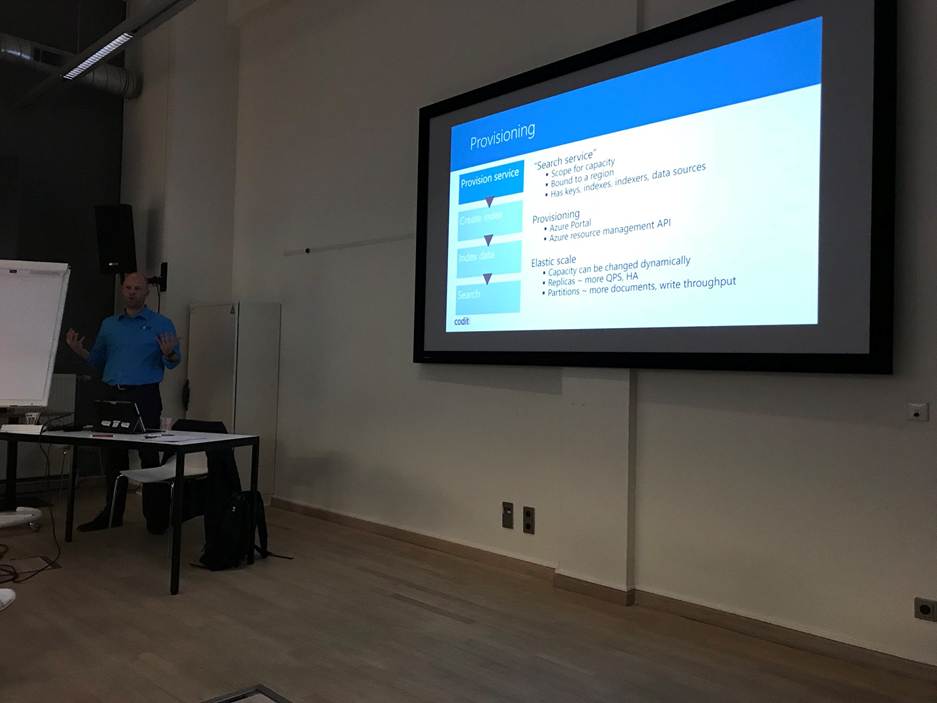
However, the proposed solution was for a knowledge base that customers could leverage via a subscription model. The crucial point was that the costs were negligible compared to the potential revenue the subscription model would net for the customer. It was an investment in a revenue-generating asset, not just a pure expense.
The Bottom Line: Innovation vs. Optimization
Thanks to Quinn, I understand that Figma is actively optimizing its infrastructure, transitioning from Ruby to C++ pipelines, migrating workloads, and implementing dynamic cluster scaling. He concluded:
They’re doing the work. More importantly, they’re growing at 46% year-over-year with a 91% gross margin. If you’re losing sleep over their AWS bill while they’re printing money like this, you might need to reconsider your priorities.
The “innovation <-> optimization continuum” is always at play. Companies often prioritize rapid innovation and speed to market, leveraging the cloud for its agility and flexibility. As they scale, they can then focus on optimizing those costs.
This increasing complexity underscores the growing importance of FinOps (Cloud Financial Operations), a cultural practice that brings financial accountability to the variable spend model of cloud, empowering teams to make data-driven decisions on cloud usage and optimize costs without sacrificing innovation.
Figma’s transparency in disclosing its cloud costs is actually a good thing. It forces a much-needed conversation about the true cost of running enterprise-scale infrastructure in 2025. The hyperbolic reactions, however, expose a fundamental misunderstanding of these realities. Which I also encountered with my Cosmos DB project in 2017.
So, the next time someone tells you that a company spending 12% of its revenue on infrastructure that literally runs its entire business is “doomed,” perhaps ask them how much they think it should cost to serve real-time collaborative experiences to 13 million users across the globe. The answer, if based on reality, might surprise them.
Lastly, as the cloud landscape continues to evolve, with new services, AI integration, and shifting geopolitical considerations, the core lesson remains: smart cloud investment isn’t about avoiding the bill, but understanding its true value in driving business outcomes and strategic advantage. The dialogue about cloud costs is far from over, but it’s time we grounded it in reality.

 Cloud Perspectives