The Walking Skeleton and Pipes & Filters: Building Resilient Integration Architectures

I’ve spent quite some time in IT doing enterprise integration, and if there’s one truth that consistently holds up, it’s that a solid foundation prevents future disappointment or failure. We’ve all been there: a rush to deliver features on a shaky, unvalidated architecture, leading to months of painful, expensive refactoring down the line.

My experience in retail showed me that, and I was involved in rebuilding an integration platform. In the world of integration, where you’re constantly juggling disparate systems, multiple data formats, and unpredictable volumes, a solid architecture is paramount. Thus, I always try to build the best solution based on experience rather than on what’s written in the literature.

What is funny to me is that when I built the integration platform, I realized I was applying patterns like the Walking Skeleton for architectural validation and the Pipes and Filters pattern for resilient, flexible integration flows.

The Walking Skeleton caught my attention when a fellow architect at my current workplace brought it to my attention. And I realized that this is what I actually did with my team at the retailer. Hence, I should read some literature from time to time!

The Walking Skeleton: Your Architectural First Step

Before you write a line of business logic, you need to prove your stack works from end to end. The Walking Skeleton is precisely that: a minimal, fully functional implementation of your system’s architecture.

It’s not an MVP (Minimum Viable Product), which is a business concept focused on features; the Skeleton is a technical proof-of-concept focused on connectivity.

Why Build the Skeleton First?

  • Risk Mitigation: You validate your major components—UI, API Gateway, Backend Services, Database, Message Broker—can communicate and operate correctly before you invest heavily in complex features.
  • CI/CD Foundation: By its nature, the Skeleton must run end-to-end. This forces you to set up your CI/CD pipelines early, giving you a working deployment mechanism from day one.
  • Team Alignment: A running system is the best documentation. Everyone on the team gets a shared, tangible understanding of how data flows through the architecture.

Suppose you’re building an integration platform in the cloud (like with Azure). In that case, the Walking Skeleton confirms your service choices, such as Azure Functions and Logic Apps, which integrate with your storage, networking, and security layers. Guess what I am going to do again in the near future, I hope.

Leveraging Pipes and Filters Within the Skeleton

Now, let’s look at what that “minimal, end-to-end functionality” should look like, especially for data and process flow. The Pipes and Filters pattern is ideally suited for building the first functional slice of your integration Skeleton.

The pattern works by breaking down a complex process into a sequence of independent, reusable processing units (Filters) connected by communication channels (Pipes).

How They Map to Integration:

  1. Filters = Single Responsibility: Each Filter performs one specific, discrete action on the data stream, such as:
    • Schema Validation
    • Data Mapping (XML to JSON)
    • Business Rule Enrichment
    • Auditing/Logging
  2. Pipes = Decoupled Flow: The Pipes ensure data flows reliably between Filters, typically via a message broker or an orchestration layer.

In a serverless environment (e.g., using Azure Functions for the Filters and Azure Service Bus/Event Grid for the Pipes), this pattern delivers immense value:

  • Composability: Need to change a validation rule? You only update one small, isolated Filter. Need a new output format? You add a new mapping Filter at the end of the pipe.
  • Resilience: If one Filter fails, the data is typically held in the Pipe (queue/topic), preventing the loss of the entire transaction and allowing for easy retries.
  • Observability: Each Filter is a dedicated unit of execution. This makes monitoring, logging, and troubleshooting exact no more “black box” failures.

The Synergy: Building and Expanding

The real power comes from using the pattern within the process of building and expanding your Walking Skeleton:

  1. Initial Validation (The Skeleton): Select the absolute simplest, non-critical domain (e.g., an Article Data Distribution pipeline, as I have done with my team for retailers). Implement this single, end-to-end flow using the Pipes and Filters pattern. This proves that your architectural blueprint and your chosen integration pattern work together.
  2. Iterative Expansion: Once the Article Pipe is proven, validating the architectural choice, deployment, monitoring, and scaling, you have a template.
    • At the retailer, we subsequently built the integration for the Pricing domain, and by creating a new Pipe that reuses common Filters (e.g., the logging or basic validation Filters).
    • Next, we picked another domain by cloning the proven pipeline architecture and swapping in the domain-specific Filters.

You don’t start from scratch; you reapply a proven, validated template across domains. This approach dramatically reduces time-to-market and ensures that every new domain is built on a resilient, transparent, and scalable foundation.

My advice, based on what I know now and my experience, is not to skip the Skeleton. And don’t build a monolith inside it. Start with Pipes and Filters and Skeleton for a future-proof, durable architecture for enterprise integration when rebuilding an integration platform in Azure.

What architectural pattern do you find most useful when kicking off a new integration project? Drop a comment!

Resilient by Design — Timeouts, Retries, and Idempotency

Recently, I attended various sessions at QCon London 2025, and one that I liked in particular was Sam Newman´s session on Timeouts, Retries, and Idempotency in Distributed Systems. My InfoQ colleague Olimpu Pop wrote an excellent news item on InfoQ, yet I wanted to write a more in-depth blog post on the session. I also feel that this topic relates to integration and building cloud solutions.

Hence, this post discusses his session, which tackles the often overlooked but critical dimensions of distributed systems: timeouts, retries, and idempotency. Delivered with clarity and urgency, it provides a blueprint for designing systems prioritizing resilience without sacrificing performance.

While much attention in modern software architecture is paid to scalability, service meshes, and observability, this post challenges that focus by spotlighting what can quietly and catastrophically derail a system—poor handling of network failures and repeated operations.

Timeouts: The Silent Guardians of System Health

Timeouts were introduced as a performance lever and a protective mechanism. A timeout isn’t about rushing a request; it’s about setting boundaries. It enforces a contract that prevents one unresponsive component from exhausting the system’s resources.

The guiding philosophy was profound yet straightforward: timeouts prioritize the overall system’s health over the success of a single request. Letting a request fail fast, while seemingly harsh, is an act of system-wide preservation.

(Source: Sam Newman’s Definition of Insanity Slide Deck)

Newman has explored scenarios in which a frontend service invokes multiple backend APIs. Without timeouts, a stalled backend can tie up resources indefinitely, leading to cascading failures. The takeaway was that timeout values should be explicitly defined and never left to defaults.

Strategic Retries: When Retrying Becomes a Threat

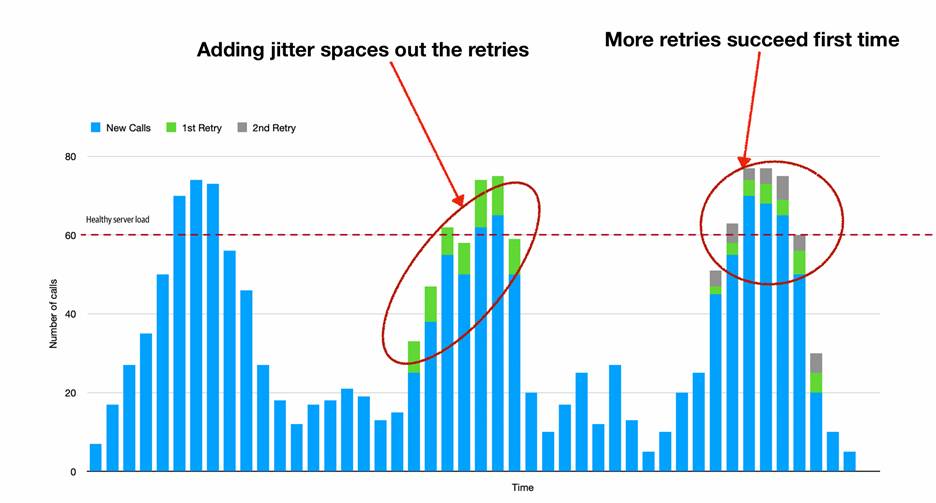
When misused, retries were described as potential self-inflicted denial-of-service attacks. Sam Newman´s discussions on retries highlighted how indiscriminate retrying, especially under load, can amplify outages and destabilize services.

Instead, Newman recommends adopting structured retry strategies using exponential backoff, jitter, and bounded attempts. These techniques reduce the likelihood of synchronized retry storms and give struggling services a chance to recover.

(Source: Sam Newman’s Definition of Insanity Slide Deck)

Libraries like Resilience4J and Polly were noted for their configurable retry mechanisms, but attendees were cautioned that no tool can replace intentional system design. The message was clear: retries should be deliberate, context-aware, and failure-conscious.

Idempotency: Making Repetition Safe

Newman then turned to idempotency—the idea that repeating an operation should have the same effect as doing it once. In distributed environments, duplicate requests are inevitable, whether due to retries (as discussed earlier), client behavior, or network glitches.

Without idempotent operations, these duplicates can lead to data corruption, financial discrepancies, or compounding business logic errors. Imagine, for example, a scenario where a payment request is processed multiple times due to network issues.

(Source: Sam Newman’s Definition of Insanity Slide Deck)

A practical solution discussed was using idempotency keys—unique identifiers that allow systems to recognize and ignore repeated operations. This approach was framed as essential, not optional, for write operations. However, achieving idempotency, especially in complex distributed systems, isn’t always straightforward. For example, ensuring idempotency across multiple services or databases (a distributed transaction) can be particularly challenging, requiring careful coordination and potentially distributed locking mechanisms. Even with idempotency keys, issues like key generation, storage, and handling concurrent requests must be addressed thoughtfully.

Participants were encouraged to audit their systems using the following question: Can this operation be safely retried? If not, safeguards need to be built in.

Timeout Budgets: Coordinating Time Across Services

One of the more advanced concepts introduced was timeout budget propagation. Rather than treating timeouts in isolation, systems should treat them as shared contracts across the entire call chain.

For instance, if a user’s request has a 2-second budget, every downstream call should be completed within its portion of that total time. Once the budget is exhausted, subsequent calls should short-circuit to avoid waste.

This leads to more intelligent and responsive systems that avoid making pointless calls and fail quickly with clarity.

Tools Are Helpers, Not Saviors

The final theme reinforced the importance of understanding over automation. Tools like Resilience4J and Polly provide robust functionality but cannot replace deep knowledge of a system’s behavior under duress.

It was emphasized that installing these libraries without understanding failure patterns, latency curves, and operational context could worsen reliability.

The recommendation was for teams to invest time in studying their systems’ behavior, conduct chaos testing, and build observability around failure and recovery mechanisms.

Bringing It Together: A Blueprint for Resilience

The trio of timeouts, retries, and idempotency formed a comprehensive framework for resilience. They were positioned not as technical trivia but as strategic imperatives.

Attendees were encouraged to formalize resilience patterns, create shared documentation for timeout policies, and continuously test their assumptions through simulated failures.

The session closed by highlighting that resilience does not emerge by accident. It must be engineered deliberately and iterated constantly.

Conclusion: From Fragile to Fault-Tolerant

Newman´s talk offered actionable insights and cautionary tales for software teams building and operating distributed systems. It shifted the conversation from high-level abstraction to the gritty realities of how distributed systems behave under failure.

In a landscape increasingly dominated by complexity and scale, small design choices—timeout values, retry conditions, and idempotency guarantees—determine whether systems bend or break.

The overarching message was simple: Every system fails. The only question is how gracefully it does so.

Key Takeaways of the session:

  • Timeouts Are About System Health, Not Just Performance: Timeouts protect the entire system by ensuring a single failing component doesn’t compromise the larger architecture.
  • Retries Need Strategy, Not Hope: Blindly retrying failed requests can worsen problems. Controlled, contextual retries with backoff policies are essential.
  • Idempotency is a Survival Mechanism: Distributed systems must gracefully handle repeated operations without unintended side effects.
  • Timeout Budgets Should Be Propagated: Passing timeout constraints downstream ensures coordinated request handling and better system responsiveness.
  • Tools Matter, But Understanding Comes First: Resilience4J, Polly, and similar libraries are powerful, but they must be used with a solid grasp of distributed system behavior.

Lastly, his website page provides more information on his topic and details on his book about distributed systems.

My Experience with Microsoft Excel During IT Projects

During my extensive career in IT, I often ran into Microsoft Excel. One of my first projects was leveraging Excel to create documentation for a telco for site surveys. I build a solution with Visual Basic for Applications, a programming language for Excel, and all the other Microsoft Office programs like Word and PowerPoint. With VBA, I could generate multiple worksheets in a Workbook filled with static and dynamic data – from a user’s input or configuration file. Once populated with data and rendered, the Workbook was converted to a Portable Document Format (PDF).

Over the last couple of years, I had other projects involving Excel. In this post, I will dive into the details of implementations (use cases) concerning Excel Workbooks. One project involved processing Excel files in a Container running on an Azure Kubernetes Service (AKS) cluster, the other generating an Excel Workbook for reporting purposes orchestrated by an Azure Logic App.

Use Case – Processing an Excel Workbook in a Container

The use case was as follows. In short, I was working on a project for a client a few years ago that required processing a standardized Excel template that their customers could provide for enrichment. The data in the excel file needed to end in a database for further processing (enrichment) so that it could be presented back to them.  The diagram below shows the process of a customer uploading an Excel file via an API. The API would store the Excel in an Azure storage container and trigger code inside a container responsible for processing (parsing the Excel to JSON). The second container had code persist the data in SQL Azure.

Use Case 1

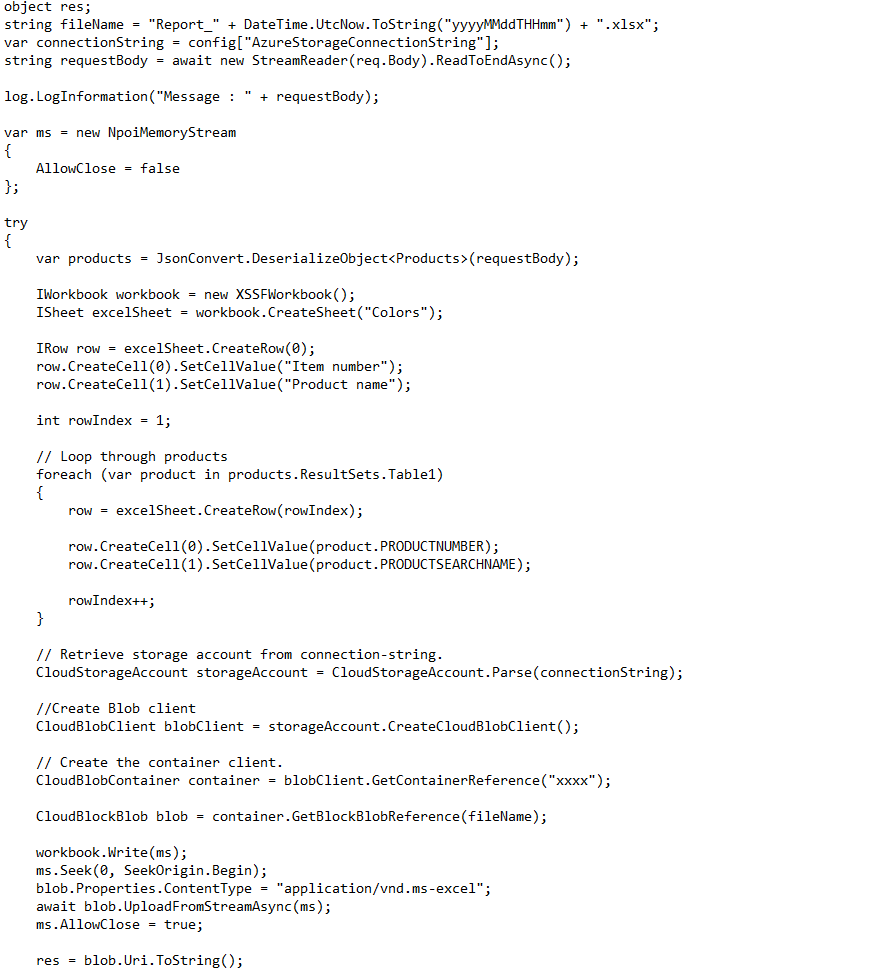
The code snippet (as an example) responsible for processing the Excel file:

For creating the Excel Workbook and its sheet with data, I found the EPPlus library, a spreadsheet library for the .NET framework and .NET core. In the project, I imported the EPPlus NuGet package – specifically, I used the ExcelPackage class.

Now let’s move on to the second use case.

Use Case – Generating an Excel Report in Azure

In a recent project for another customer, I had to generate a report of products inside D365 that needed to be an Excel File (a workbook containing a worksheet with data). The file had to be written to an on-premises file share to allow the target system to consume it. The solution I built was using a Logic App to orchestrate the project of generating the Excel file.

Below you see a diagram visualizing the steps from triggering a package in D365 until the writing of the Excel file in a file share on-premises.

Use Case 2

The steps are:

  1. Logic App triggering a package in D365 (schedule trigger).
  2. Executing the package to retrieve and export data to a SQL Azure Database.
  3. Query by the same Logic App that triggered the package to retrieve the data from the SQL Azure Database.
  4. Passing the data to (the result of the query) to an Azure Function, which will create an Excel Workbook with one sheet containing the data in a given format. The function will write the Excel to an Azure Storage container.
  5. Subsequently, the Logic App will download and write the file to the on-premises file share (leveraging the On-Premises Data Gateway – ODPGW).

The sequence diagram below shows the flow (orchestration) of the process.

Sequence diagram

And below is a part of the Logic App workflow definition resembling the sequence diagram above.

The code snippet (as an example) in the Azure Function responsible for creating the Excel file:

For the creation of the Excel Workbook and sheet with data, I used NPOI – an open-source project which can help you read/write XLS, DOC, and PPT file extensions. In Visual Studio, I imported NPOI NuGet Package. The package covers most of the features of Excel like styling, formatting, data formulas, extracting images, etc. In addition, it does not require the presence of Microsoft Office. Furthermore, I used the StorageAccountClass to write the Excel file.

Conclusion

Microsoft Excel is a popular product available for decades and used by millions of people ranging from businesses heavily relying on Excel to home users for basic administration. Moreover, in IT, Excel is used in many scenarios such as project planning, environment overviews, project member administration, reporting, etc. As said earlier, I have encountered Microsoft Excel various times in my career and built solutions involving the product. The two use-cases are examples of that.

In the first example, I faced a challenge finding a library that supported .NET Core 2.0. I found EPPlus, which did the job for us after experimenting with it first. In the second example, the cost and simplicity were the benefits of using the NPOI library. There were constraints in the project to use solutions with a cost (subscription-based or one-off). Furthermore, the solution proved to be stable enough to generate the report.

Note that the libraries I found are not the only ones available to work with Excel. For instance, SpreadsheetGear, and others, which are listed here. In Logic Apps, you can find connectors that can do the job for you, such as CloudMersive (API you connect to convert, for instance, CSV to Excel).

I do feel with code you have the most flexibility when it comes to dealing with Excel. A standard, of-the-shelve can do the job for you, however, cost (licensing) might be involved or other considerations. What you choose in your scenarios depends on the given context and requirements.

The value of having a Third-party Monitoring solution for Azure Integration Services

My day-to-day job focuses on enterprise integration between systems in the cloud and/or on-premises. Currently, it involves integration with D365 Finance and Operations (or Finance and Supply Change Management). One aspect of the integrations is monitoring. When a business has one or more Azure Integration Service running in production, the operation aspect comes into play. Especially integrations that support crucial business processes. The operations team requires the correct procedures, tools, and notifications (alerts) to run these processes. Procedures and receiving notifications are essential; however, team members need help identifying issues and troubleshooting. Azure provides tools, and so do third-party solutions. This blog post will discuss the value of having third-party monitoring in place, such as Serverless360.

Serverless360

Many of you who read blogs on Serverless360 know what the tool is. Moreover, it is a service hosted as a Software as a Service (SaaS). Therefore, operation teams can require access once a subscription is acquired or through a trial. Subsequently, they can leverage the primary business application, business activity monitoring, and documenter feature within the service. We will briefly discuss each feature and its benefits and value in the upcoming paragraphs.

Business Applications

A team can configure, and group integration components with the business applications feature a so-called “Business Application” to monitor. It does not matter where the resources reside – within one or more subscriptions/resource groups.

Business Application

The overview shown above is the grouping of several resources belonging to an integration solution. In one blink of an eye, a team member of the operations team can see the components’ state and potential issues that need to be addressed. Can the same be done in Azure with available features such as Azure Monitor, including components like Application Insights? Yes, it can be done. However, it takes time to build a dashboard. Furthermore, when operations are divided into multiple tiers, first-tier support professionals might not be familiar with the Azure Portal. In a nutshell, an overview provided by Business Application is not present in Azure out-of-the-box.

As Lex Hegt, Lead Product Consultant at BizTalk360, points out:

Integration solutions can span multiple technologies, resource groups, tags, and even Azure subscriptions. With the Azure portal having the involved components in all those different places, it is hard to keep track of the well-being of those components. Serverless360 helps you utilize the concept of Business Applications. A Business Application is a container to which you can add all the components that belong to the same integration. Once you have added your components to a Business Application, you can set up monitoring for those components, provide access permissions, and administer them.

The Business Application brings another feature that provides an overview of the integration components and dependencies. You might be familiar with the service map feature in Application Insights on a more fine-grained level. The service map in Serverless360 is intended to show the state of each component and dependency on a higher level.

Within a business application, the configuration of monitoring components is straightforward. By selecting the component and choosing the monitoring section, you can set thresholds of performance counters and set the state.

Performance Counters

The value of Business Applications is a quick view of the integrations state and the ability to dive into any issue quickly, leading to time-saving by spending far less time identifying the problem (see, for instance, Application Insights health check with Serverless360, and Integrating Log Analytics in Serverless360). With more time on their hand’s operations teams can focus on various other matters during a workday or shift. Furthermore, the ease of use of Business Applications doesn’t require support people in a first-tier support team to have a clear understanding and experience of the Azure portal.

Having a clear overview is one thing. However, it also helps operations teams get notifications or finetune metrics based on thresholds and only receive information when it matters. In addition, it’s essential to keep integrations operational when they support critical business processes, as any outage costs a significant amount of money.

Business Activity Monitoring

The second feature of Serverless360 is the end-to-end tracking capability called Business Activity Monitoring (BAM). The BAM feature organization can instrument their Azure resources that support integrations between systems. Through a custom connector and SDK, you can add tracking to Logic Apps and Azure Functions that are a part of your integration. A unique generated transaction instance-id in the first component will be carried forward to the subsequent stages in more functions and Logic Apps.

The operations team must do some work to leverage the BAM functionality. They need to set up the hosting of the BAM infrastructure, define the business process, instrument the business process and add monitoring (see, for instance, Azure Service Bus Logging with BAM – Walk-through). Once that is done, a clear view of the process and its stages are available.

Business Activitity Monitoring (BAM)

The benefit of the BAM feature is a concise overview of the configured business processes. Moreover, you get an overview of the complete process and potentially see where things go wrong.

Azure Documenter

The final feature Serverless360 offers the Azure Documenter is intended to generate documentation. Operations teams can generate documentation for the subscription that contains the integrations with the documenter. It is good to have a dedicated subscription for integration solutions to govern better and manage Azure resources.

When operations teams like to generate documentation, they can choose between different templates, storing of the document, and billing range.

Azure Documenter

The benefit of having documentation of the integrations in a subscription is having a clear overview of the components, details, and costs (consumption). While the Azure portal offers a similar capability, you will have to go to the Cost management and billing to see consumption and cost, Azure Advisor, and other places. Furthermore, there is no feature to generate documentation to help report the Azure resources’ state.

Report Azure Documenter

The value of the Azure Documenter is the flexibility for generating documentation on a different level of granularity. Furthermore, by frequently running the documenter, you can spot differences like an unexpected increase in cost provide executive reports and information for your knowledge base for integrations.

Conclusion

Features and benefits of Serverless360 have been outlined in this blog post. Of course, there are many more features. Yet, we focused on the most significant one that provides Operations teams the most value. That is a clear overview of the state of integrations in a single-pane-of-glass and the ability to quickly drill down into integration components and spot issues at a fine-grained level. Furthermore, Business Activity Monitoring and Azure Documenter provide end-to-end tracking and generated documentation.

Serverless 360 Monitoring

Serverless360 offers an off-the-shelf product for monitoring not directly available in the Azure Portal. As an organization, you can decide whether to buy a product or build a custom solution, or both to fulfill monitoring requirements for integration solutions. Serverless360 can be the solution for organizations looking for a product to meet their needs. It has unique features which are not directly available in Azure or require a substantial investment to achieve.

For more details and Serverless360 in action, see the webinar of Michael Stephenson: Support Strategy for Event-Driven Integration Architectures and the latest features blog.

Some Cloud IT Trends in 2022

We are a few weeks into 2022, and you might have seen or read articles and reports on trends for this year. I also like to outline the few significant IT trends in this blog post from my point of view based upon my work as Cloud Editor for InfoQ and experiences in the consulting field.

First of all, the importance of Artificial Intelligence (AI). You can see that Microsoft, for example, is structurally building these kinds of capabilities into their entire platform. Its intelligence is increasing rapidly, and you can already see with enterprises that they can quickly make valuable business applications with it.

Microsoft Azure AI Platform

Microsoft is already implementing it in their Azure environment. For example, monitoring users’ login behavior is a straightforward example: they continuously keep track of which user logs in when and from which location. They also immediately pass all the data they collect through an AI robot, which will make connections. Furthermore, other examples are that the company enhanced its Translator service and launched the Azure OpenAI service. And it’s not just Microsoft as other public cloud vendors AWS and Google are on board too.

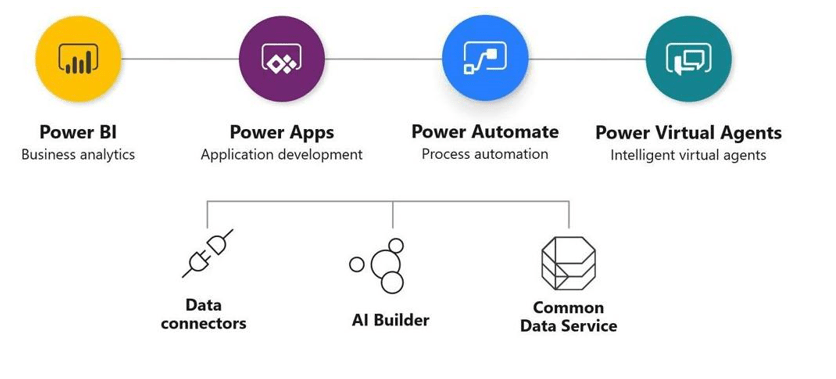
The second trend I see is that more and more companies are looking at options for customizing applications without really having to program, with no code or low code. This has been in the spotlight for some time now, especially among larger companies that would like to facilitate their so-called citizen developers to develop software for use in their own work.

To this end, Microsoft has developed the Power Platform over the past two to three years into a mature low-code platform, which is also interesting for larger organizations. However, you do have to look closely at governance; you can’t just release that completely to users, and you have to build in-game rules, frameworks, and guidelines.

Microsoft Power Platform

We also see increasing adoption of that platform among enterprises, especially with Dynamics 365. The combination of Dynamics 365, Office 365, and Power Platform is becoming a compelling low-code platform for building business applications. Microsoft has an excellent starting position in the low-code market space with competitors like OutSystems, Mendix, and offerings by AWS (HoneyCode, Amplify) and Google (AppSheets). Also, I recommend reading the InfoQ article: Low-Code Platforms and the Rise of the Community Developer: Lots of Solutions, or Lots of Problems?

The third major trend is cloud integration. In recent years, many organizations have moved to the cloud with their applications and data or will move in the wake of COVID-19. Moreover, organizations that have moved to the cloud are now discovering that as you adopt more cloud technology, the need for integration between those systems increases.

Assume you have a CRM from Microsoft, an ERP from SAP, and a data warehouse on Azure. Your business processes run across all those systems. So you must therefore ensure that these systems can exchange data with each other. And you have to make sure that if you have a CRM in the cloud and a customer portal based on customization, you can also see your customer data in that portal. Or some data needs to enter a system on-premise. So, in the end, you need to integrate that!

Therefore, the need for cloud integration is increasing, especially among organizations increasingly investing in the cloud. Microsoft has an answer to that, too, with a perfect and very complete integration platform on Azure named Azure Integration Services (AIS). As a result, even the most demanding enterprises can meet their needs with this.

Azure Integration Services

Recent analyst reports from Gartner and Forrester showed the services are leading. For example, Microsoft was among the leaders in the latest Forrester Wave for Enterprise Integration-Platform-as-a-Service (iPaaS) 2021. In addition, it has been in the leader quadrant of iPaaS reports from Gartner consistently over the last couple of years and that also accounts for API Management.

Lastly, with the last trend, the need for integration increases, and so will the demand for supporting and monitoring them.

Implementing Pipes and Filters Pattern using Azure Integrations Services

In my first blog post, I like to discuss implementing the pipes and filter pattern using Azure Integration Services (AIS).

A Pipe and Filter pattern uses multiple event queues and topics to streamline events’ flow across numerous cloud services. You can implement this by using queues or topics in a service bus namespace and Logic Apps or Azure Functions. Implementing this pattern with the mentioned services allows you to process messages in multiple stages like receiving, validating, processing, and delivering. Moreover, you can also opt for an event-driven approach using Logic Apps, Event Grid, and Functions.

The Pipe and Filter pattern is described in the Microsoft docs as a way to decompose complex processing into a series of separate elements that can be reused, providing improved performance, scalability, and reusability. Each element in the context of Azure Integration Services (AIS) can be either a Logic App or Azure Function and connected through a topic – which can be either a Service Bus Topic or an Event Grid Topic. The latter allows an event-driven approach to the pattern.

To process messages more timely, choosing the Event Grid is more efficient than using a service bus queue. Although you can select the queue or topic as a pipe with the pipe and filter pattern, having each filter subscribe and publish to them. However, it is less efficient as you will need to poll the queue or topic quite frequently.

Assume you receive multiple order files as a batch during the day, and these need to be processed as soon as possible in the shortest amount of time. You would need a way to receive or pick the files, validate them, process them, and subsequently deliver them to one or more sub-systems or locations. In the diagram below, we outlined the scenario.

Pipes and filter pattern implementation diagram

In the scenario, the Logic App function as on- and off-ramp receiving and sending data. The benefit of leveraging Logic Apps for data transport is its versatility in connectors. By leveraging the out-of-the-box connectors, you can consistently use a standard connector, in this case, Secure File Transport (SFTP).

Next, the functions will act as single processing units, i.e., one will store the data, including adding instance properties (context). Finally, another is triggered because the files are stored as a blob in a storage container (blobCreated Event). The chaining of the functions is done through the event mechanism – each storing of a blob results in an event (blobCreated) that another function can subscribe to. And lastly, a Logic App can be triggered to deliver the processed file. Moreover, multiple Logic Apps could be activated to deliver the file to various locations using various connectors if necessary.

The benefit of using functions is that you can have them scaled automatically (and thus also have elasticity) using Serverless mode (consumption) as a hosting option. Or, if you need more compute you can choose premium or dedicated plans. And by adding more compute, the performance of processing the files can be increased.

With the implementation of the pipes and filter pattern described above, you can see that you could easily reuse components (functions), add or remove components or shift around if necessary – hence you also have flexibility (agility). As described in the enterprise integration pipe and filter pattern with the context of the implementation:

Each filter (Function) exposes a straightforward interface (Binding): it receives messages on the inbound pipe (Event Grid Topic), processes the message, and publishes the results to the outbound pipe (Storage Container). The pipe (Event Grid Topic) connects one filter to the next, sending output messages from one filter to the next. Because all components use the same external interface, they can be composed into different solutions by connecting the components to other pipes. We can add new filters, omit existing ones or rearrange them into a new sequence — all without changing the filters themselves. The connection between filter and pipe is sometimes called port. Each filter component has one input port (Event Grid Topic) and one output port (Storage Account) in the basic form.

To summarize, the pipe and filter pattern brings the following benefits:

  • loose and flexible coupling of components (filters)
  • flexibility as it allows filters to be changed without modifications to other filters
  • parallel processing
  • reusability as each component (filter) can be called and used repeatedly

Note that it is less suitable when there are too many components (filters) concerning performance. Individually, the components – functions in our example can be tuned using the available hosting options – however, the sum of all the components determines the overall performance. Furthermore, the pattern is not suitable for interactive systems or long-running processes.

And lastly, with the pipe and filter pattern, there are also some challenges or considerations when implementing it according to the Microsoft documentation. For example, it mentions complexity when filters are distributed across servers. However, in our example, every component is presumably in the same Azure region, and messages are persisted in storage, benefiting from the built-in redundancy (reliability is available as well).

Finally, again in our example, when a message fails to reprocess, it is an option to reprocess it (retry); however, it depends on whether the message has to be reprocessed or dropped in a different container in the storage account. And when that happens, it is up to how monitoring and notifications are set up to troubleshoot and correct the error.