
As an earlier adopter of Azure Cosmos DB, I have always been following the developments of this service and have built up my experience myself with leveraging it for monitoring purposes (a recent one is presented at Azure Cosmos DB Conf 2023 – Leveraging Azure Cosmos DB for End-to-End Monitoring of Retail Processes).
Azure Cosmos DB
For those unfamiliar with Azure Cosmos DB, Microsoft’s globally distributed, multi-model database service offers low-latency, scalable storage and querying of diverse data types. It allows developers to build applications with data access and high availability across regions. Its well-known counterpart is Amazon DynamoDB.
In this blog post, I like to point out some recent optimizations of the service around performance. Moreover, I have written an InfoQ news item recently on this as well.
Priority-based execution
One of the more recent features introduced in the service is priority-based execution, which is currently in public preview. It allows users to define the priority of requests sent to Azure Cosmos DB. When the number of requests surpasses the configured Request Units per second (RU/s) limit, lower-priority requests are slowed down to prioritize the processing of high-priority requests, as specified by the user’s defined priority.
As mentioned in a blog post by Microsoft, this feature empowers users to prioritize critical tasks over less crucial ones in situations where a container surpasses its configured request units per second (RU/s) capacity. Less important tasks are automatically retried by clients using an SDK with the specified retry policy until they can be successfully processed.
With priority-based execution, you have the flexibility to allocate varying priorities to workloads operating within the same container in your application. This proves beneficial in numerous scenarios, including prioritizing read, write, or query operations, as well as giving precedence to user actions over background tasks like bulk execution, stored procedures, and data ingestion/migration.
Once accepted, a nomination form is available to access the feature and .NET SDK.
Hierarchical Partition Keys
In addition to Priority-based execution, the product group for Cosmos DB also introduced Hierarchical Partition Keys to optimize performance.
Hierarchical partition keys enhance Cosmos DB’s elasticity, particularly in scenarios where users utilize synthetic- or logical partition keys surpassing 20 GB of data. By employing up to three keys with hierarchical partitioning, users can effectively sub-partition their data, achieving superior data distribution and enabling greater scalability. Azure Cosmos DB automatically distributes the data among physical partitions, allowing logical partition prefixes to exceed the 20GB storage limit.
According to the documentation, the simplest way to create a container and specify hierarchical partition keys is using the Azure portal.

For example, you can use hierarchical partition keys to partition data by tenant ID and then by item ID. This way, all items for a given tenant are stored together in the same physical partition. This can improve query performance by reducing the number of physical partitions that need to be queried.
A more detailed explanation and use case for hierarchical keys in Azure Cosmos DB can be found in the blog post by Leonard Lobel.
Burst Capacity Feature
Lastly, the team also made the burst capacity feature for Azure Cosmos DB generally available (GA) to allow you to take advantage of your database or container’s idle throughput capacity to handle traffic spikes.
Burst capacity allows each physical partition to accumulate up to 5 minutes of idle capacity, which can be utilized at a rate of up to 3000 RU/s. This feature is applicable to databases and containers utilizing manual or autoscale throughput, provided they have less than 3000 RU/s provisioned per physical partition.
To begin utilizing burst capacity, access the Features page within your Azure Cosmos DB account and enable the Burst Capacity feature. Please note that the feature may take approximately 15-20 minutes to become active once enabled.
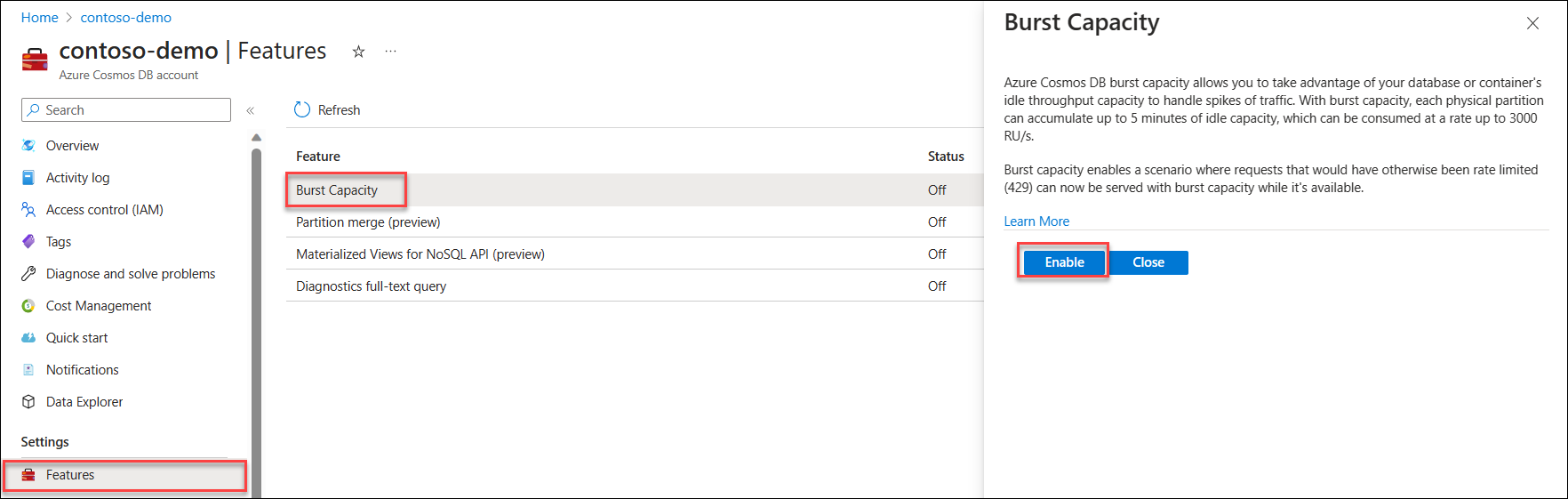
Enabling the burst capacity feature (Source: Microsoft Learn Bust Capacity)
According to the documentation, to use the feature, you need to consider the following:
- If your Azure Cosmos DB account is configured with provisioned throughput (manual or autoscale), burst capacity is not applicable. Burst capacity is specifically for serverless accounts.
- Additionally, burst capacity is compatible with Azure Cosmos DB accounts utilizing the API for NoSQL, Cassandra, Gremlin, MongoDB, or Table.
Lastly, in case you are wondering what the difference between burst capacity and priority-based execution is, Jay Gordon, a Senior Cosmos DB program manager, explained that in the discussion of the blog post around these performance features:
The difference between burst capacity and execution based on priority lies in their impact on performance and resource allocation:
Burst capacity affects the overall throughput capacity of your Azure Cosmos DB container or database. It allows you to temporarily exceed the provisioned throughput to handle sudden spikes in workload. Burst capacity helps maintain low latency and prevent throttling during peak usage periods.
Execution based on priority determines the order in which requests are processed when multiple concurrent requests exist. Higher priority requests are prioritized and typically get faster access to resources for execution. This ensures that essential or time-sensitive operations are processed promptly, while lower-priority requests may experience slight delays.
“In terms of results, burst capacity and execution based on priority are independent. Utilizing burst capacity allows you to handle temporary workload spikes, whereas execution based on importance ensures that higher-priority requests are processed more promptly. These mechanisms work together to optimize performance and resource allocation in Azure Cosmos DB, but they serve different purposes“.
Conclusion
In conclusion, Azure Cosmos DB continues to evolve with new features designed to enhance performance and scalability. The priority-based execution, currently in public preview, enables users to prioritize critical tasks over less important ones when the request unit capacity is exceeded. This flexibility is further enhanced by introducing hierarchical partition keys, allowing optimal data distribution and larger scales in scenarios with substantial data. Additionally, the burst capacity feature, now generally available, provides an efficient way to handle traffic spikes by utilizing idle throughput capacity. Users can easily enable burst capacity through the Azure Cosmos DB account’s Features page, making it a valuable tool for serverless accounts.
Returning to Amazon, DynamoDB, the Cosmos DB counterpart on AWS, offers performance-optimizing capabilities. Concepts are similar.
 Cloud Perspectives